Every team wants the same thing from a software project: a product that works, ships on time, and does not fall apart the moment real users touch it. The Software Development Life Cycle, usually shortened to SDLC, is the framework that helps you get there. It breaks the messy work of building software into clear phases, so nothing important slips through the cracks.
On its own, though, a life cycle is just a diagram on a wall. What turns it into successful projects is the set of habits and decisions your team makes inside each phase. That is what this guide is about. Below you will find the phases explained in plain language, the models you can choose from, and a set of Software Development Life Cycle best practices you can start applying this week.
What Is the Software Development Life Cycle?
The Software Development Life Cycle is a structured process for taking a piece of software from an idea to a running product, and then keeping it healthy over time. Think of it as a repeatable path rather than a one-time checklist. Each phase has a goal, a set of activities, and an output that feeds the next phase.
Most teams describe the SDLC in seven phases. The names vary a little from one company to another, but the intent stays the same.
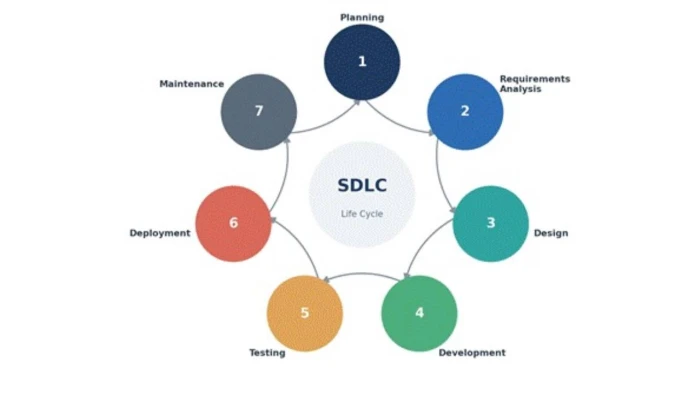
The Core Phases at a Glance
| Phase | What Happens | Typical Output |
| Planning | Define the goal, scope, budget, timeline, and the value the project should deliver. | Project charter, feasibility notes |
| Requirements Analysis | Talk to stakeholders and users, then write down what the software must do. | Requirements document, user stories |
| Design | Decide how the system will be built: architecture, data models, and interfaces. | Design specs, wireframes, diagrams |
| Development | Write the code that turns the design into working features. | Source code, builds |
| Testing | Check the software against the requirements and hunt for defects. | Test reports, defect logs |
| Deployment | Release the software to users in a controlled, reversible way. | Live release, release notes |
| Maintenance | Fix issues, patch security holes, and add improvements over time. | Updates, patches, monitoring data |
Why SDLC Best Practices Matter for Project Success
It is tempting to skip straight to writing code. Deadlines are real, and typing feels like progress. The problem is that shortcuts taken early tend to come back much more expensive later. A requirement misunderstood in week one can turn into weeks of rework after launch.
The chart below shows a pattern that has held up across decades of software research. The later a defect is caught, the more it costs to fix, because more work has been built on top of the mistake.
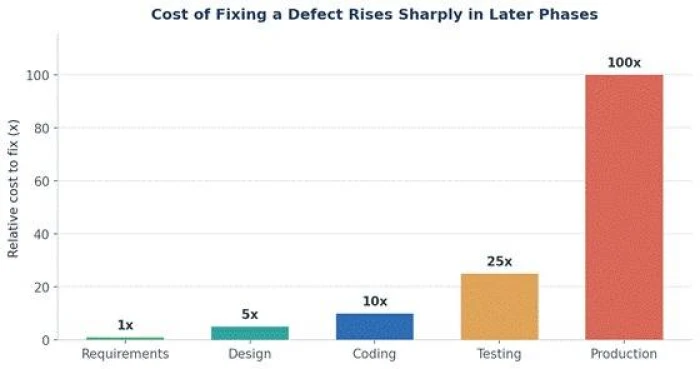
This single idea drives many of the best practices that follow. When you invest a little more in the early phases and catch problems close to where they start, you save a great deal of time, money, and stress down the line.
Choosing the Right SDLC Model
Before the best practices, it helps to pick a model that fits your project. The model shapes how the phases flow, how often you release, and how you handle change. Here are the most common options and where each one shines.
| Model | How It Works | Best For | ||
| Waterfall | Phases run in a fixed sequence, each finished before the next begins. | Stable requirements, strict compliance work | ||
| Agile | Short iterations deliver working software every few weeks. | Evolving requirements, fast feedback | ||
| Scrum | An Agile framework built around fixed sprints and defined roles. | Product teams that value regular cadence | ||
| Iterative | Build a rough version, then refine it over repeated cycles. | Large systems where early feedback matters | ||
| Spiral | Repeated loops with a heavy focus on risk assessment. | High-risk, high-budget projects | ||
| DevOps | Development and operations merge with heavy automation and continuous delivery. | Teams that ship often and value reliability | ||
Quick tip There is no single best model. If your requirements are likely to change, lean Agile or iterative. If they are locked and heavily regulated, a Waterfall approach may serve you better. Many teams blend models to suit their reality. | ||||
Software Development Life Cycle Best Practices
The practices below are grouped roughly in the order you meet them across the life cycle, from planning through maintenance. You do not have to adopt all of them at once. Pick the ones that address your biggest pain points, get them working, and add more over time.
1. Invest Time in Clear Requirements Gathering
Most failed projects can trace their trouble back to fuzzy requirements. When nobody agrees on what the software should do, teams build the wrong thing beautifully. Spend real time with stakeholders and end users before a line of code is written.
- Write requirements as small, testable statements rather than vague wishes.
- Use user stories in the form: as a user, I want a goal, so that I get a benefit.
- Confirm your understanding by playing it back to stakeholders in your own words.
- Keep a single source of truth for requirements so everyone works from the same page.
2. Plan Realistically and Break Work Into Small Pieces
A plan built on hope tends to collapse under pressure. Estimate with the team that will do the work, not just the managers who report on it. Then split big goals into small tasks that can be finished and verified quickly.
- Break features into chunks that take days, not months, to complete.
- Add buffer for testing, review, and the unexpected, because the unexpected always arrives.
- Track progress against outcomes delivered, not hours logged.
3. Design for Scalability and Maintainability
Good design is the quiet reason some codebases stay pleasant to work in for years while others rot. Before development starts, agree on the architecture, the data model, and how components will talk to each other. Aim for a design that a new team member could understand without a two-hour explanation.
- Favor simple, modular components over one giant tangled block.
- Document key design decisions and, just as importantly, why you made them.
- Think about load, growth, and failure early rather than bolting them on later.
4. Follow Consistent Coding Standards
Code is read far more often than it is written. Shared coding standards make a codebase feel like it came from one mind instead of ten. This lowers the effort of every future change and every new hire.
- Agree on naming, formatting, and structure, then enforce them with automated linters and formatters.
- Keep functions small and focused on a single job.
- Write code for the human who will read it next, which is often you in six months.
5. Make Version Control a Non-Negotiable
Version control is the safety net under everything else. It records who changed what and when, lets several people work in parallel without stepping on each other, and makes it easy to roll back when something breaks.
- Commit small and often, with messages that explain the why, not just the what.
- Use branches for new work and merge through a clear, agreed process.
- Protect your main branch so nothing reaches it without review and passing checks.
6. Review Code Before It Merges
A second pair of eyes catches bugs, spreads knowledge, and quietly raises the quality bar for the whole team. Code review is one of the cheapest quality practices you can adopt, and one of the most effective.
- Keep changes small so reviews stay quick and thorough.
- Review the code, not the coder, and keep feedback specific and kind.
- Treat review comments as shared learning, not personal criticism.
7. Test Early and Test Often
The habit of moving testing as close to development as possible is often called shifting left. Instead of saving all testing for a phase at the end, you weave it throughout. Bugs found minutes after they are written are far cheaper to fix than bugs found by users.
- Write automated unit tests alongside the code they check.
- Add integration and end-to-end tests for the paths that matter most.
- Run the full test suite automatically on every change.
Why this pays off Automated tests act like a tireless teammate who checks the whole product every single time you change something. They give you the confidence to move fast without breaking things you already shipped. |
8. Automate Your Build and Deployment Pipeline
Manual releases are slow and error-prone. Continuous integration and continuous delivery, together known as CI and CD, automate the steps from code change to running software. Every change is built, tested, and made ready to release without a human copying files around at midnight.
- Automate the build so a broken build is caught within minutes.
- Deploy in small, frequent increments to lower the risk of each release.
- Make rollbacks easy so a bad release is an inconvenience, not a crisis.
9. Bake Security Into Every Phase
Security is not a checkbox for the end of the project. When it is treated as an afterthought, it becomes an emergency. Folding security into each phase, an approach often called DevSecOps, keeps small risks from growing into breaches.
- Consider threats during design, not after an incident.
- Scan dependencies and code for known vulnerabilities automatically.
- Follow the principle of least privilege for data, systems, and people.
10. Keep Documentation Living and Useful
Documentation has a bad reputation because so much of it is written once and never touched again. Useful documentation is short, current, and close to the code it describes. It saves your future self and every teammate hours of guesswork.
- Document the decisions and the reasoning, since code already shows the how.
- Keep a clear setup guide so a new developer can run the project on day one.
- Update docs as part of the change, not as a chore for later.
11. Communicate Continuously With Stakeholders
Software is a team sport, and surprises are the enemy. Regular, honest communication keeps everyone pointed in the same direction and surfaces problems while they are still small and cheap to solve.
- Show working software often instead of long status reports.
- Raise risks early, even when the news is uncomfortable.
- Make sure business goals and technical work stay connected throughout.
12. Monitor, Measure, and Learn After Release
Shipping is the start of a product's life, not the end. Once real users arrive, monitoring tells you how the software actually behaves, and that feedback loops right back into your planning for the next cycle.
- Track errors, performance, and usage so you learn from real behavior.
- Set up alerts for the problems that would hurt users the most.
- Run short retrospectives to turn lessons into concrete improvements.
Where Effort Goes Across the Life Cycle
Teams often assume development is the whole job. In practice, the work is spread across every phase, and the parts that feel less glamorous, like requirements and testing, protect the parts that feel like real progress. The chart below shows a typical split for a healthy project.
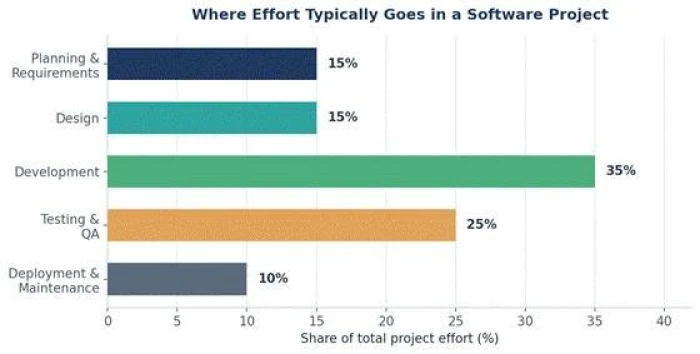
The exact numbers shift from project to project, but the message is steady. If your plan gives almost all of its time to coding and treats everything else as a rounding error, that is a warning sign worth taking seriously.
Measuring the Impact of Best Practices
Best practices are easier to defend when you can point to results. The comparison below is indicative rather than a promise, since every team is different, but it reflects the direction real teams tend to move when they adopt disciplined SDLC habits.
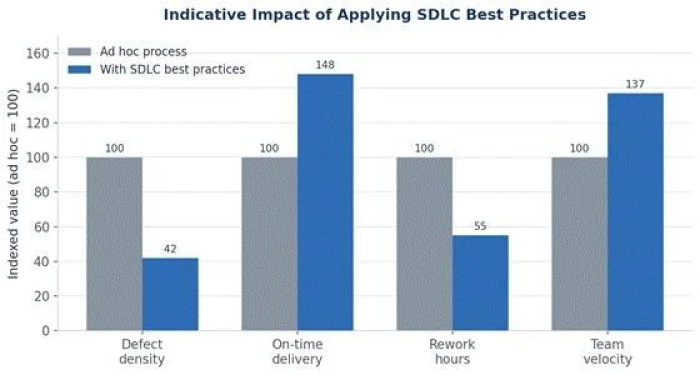
Metrics Worth Tracking
| Metric | What It Tells You | Direction You Want |
| Defect density | Bugs found per unit of code or per release. | Lower over time |
| Lead time for changes | How long from code committed to running in production. | Shorter |
| Deployment frequency | How often you can safely ship. | Higher |
| Change failure rate | Share of releases that cause a problem. | Lower |
| Mean time to recovery | How fast you bounce back from an incident. | Shorter |
| Test coverage | How much of the code your tests exercise. | Healthy and stable |
Common Pitfalls to Avoid
Knowing what to do is only half the picture. These are the traps that quietly derail otherwise capable teams.
| Pitfall | Why It Hurts | Better Move |
| Skipping requirements | You build the wrong product efficiently. | Validate needs before design begins |
| Testing only at the end | Defects pile up where they cost the most. | Shift testing left and automate it |
| Ignoring technical debt | Small compromises compound into a slow, brittle system. | Budget time to pay debt down regularly |
| No version control discipline | Lost work and painful merges become routine. | Adopt clear branching and review rules |
| Poor communication | Teams drift apart and rework multiplies. | Show working software and talk often |
| Treating launch as the finish | Real issues surface with no plan to catch them. | Monitor, measure, and iterate after release |
A Quick SDLC Best Practices Checklist
Use this as a fast health check for any project. If you can honestly tick most of these, you are on solid ground.
1. Requirements are written down, testable, and agreed by stakeholders.
2. The plan breaks work into small, verifiable pieces with room for the unexpected.
3. Architecture and design decisions are documented before development.
4. Coding standards are automated and applied to every change.
5. All work lives in version control with reviews on the main branch.
6. Automated tests run on every change, and the build must stay green.
7. Releases are automated, small, and easy to roll back.
8. Security is considered in every phase, not just at the end.
9. Documentation is current and lives close to the code.
10. Production is monitored, and lessons feed the next cycle.
Bringing It All Together
The Software Development Life Cycle gives you a map, but the best practices are what keep you on the road. None of them are exotic. Clear requirements, honest planning, thoughtful design, steady testing, automation, security, communication, and a habit of learning after release. Applied together, they turn software delivery from a gamble into a repeatable, improvable process.
Start small. Choose two or three practices that address your team's sharpest pain, make them stick, and build from there. Successful projects are rarely the result of one heroic effort. They come from good habits, repeated cycle after cycle, until quality stops being something you chase and becomes simply how you work.
Frequently Asked Questions
What is the main goal of the Software Development Life Cycle?
The main goal of the SDLC is to deliver high quality software that meets user needs, on time and within budget, through a structured and repeatable process. It reduces risk by giving each phase a clear purpose and output.
Which SDLC model is the best?
There is no single best model. Waterfall suits stable, heavily regulated projects, while Agile and iterative models fit work where requirements evolve and fast feedback matters. Many teams blend models to match their situation.
How does testing fit into the SDLC?
Testing works best when it runs throughout the life cycle rather than only at the end. Catching defects close to where they are created keeps them cheap to fix and protects the quality of everything built afterward.
Are these best practices only for large teams?
No. Small teams and solo developers benefit just as much. Version control, automated testing, clear requirements, and simple documentation scale down gracefully and often deliver the biggest relative gains for small teams.