Let’s be honest: buying an AI tool is way too easy. A slick demo, a "limited-time" banner, a friend who swears by it and suddenly there’s another subscription humming away on your card. Some of them are genuinely brilliant. Plenty are shiny toys you’ll forget about by next month.
So before you hand over your money, slow down for five minutes and ask yourself these seven questions. Think of it as a quick chat with the sensible friend who always asks "…but do you actually need it?" Nothing technical, no spreadsheets required just the stuff that saves you from buyer’s remorse.
How to use this Run through the seven questions before any purchase. If a tool sails through all of them, buy with confidence. If it stumbles on two or more, that’s your gut telling you to wait. |
1. What am I actually trying to fix here?
Start with the boring-but-crucial one. What problem is this tool solving for you, specifically? "It looks cool" and "everyone’s using it" are not problems. "I spend three hours a week writing product descriptions and I hate it" that’s a problem worth paying to solve.
If you can’t finish the sentence "I’m buying this so I can stop…," you probably don’t need it yet. Write down the exact task you want to hand off. Then check whether this tool actually does that task not five adjacent things you’ll never touch.
Quick gut-check Can you name the one task this replaces or speeds up? If not, close the tab. |
2. Have I actually tried it — or am I buying on vibes?
Almost every AI tool has a free trial or a free tier. Use it. Really use it on your own real work, not the polished sample data they hand you. Demos are designed to look magical. Your messy, real-world files are where you find out if it holds up.
Give it one genuine task you care about and see how it feels. Did it save you time, or did you spend twenty minutes fighting the interface and fixing its output? Buying on vibes is how you end up with five subscriptions you’ve opened once.
3. What’s the real price, not the sticker price?
That friendly "$20/month" on the pricing page is almost never the whole story. The real number shows up once you add extra seats for your team, the "pro" features you actually need, onboarding time, and the annual-plan lock-in they nudge you toward. Always ask what this costs a year from now, fully loaded.
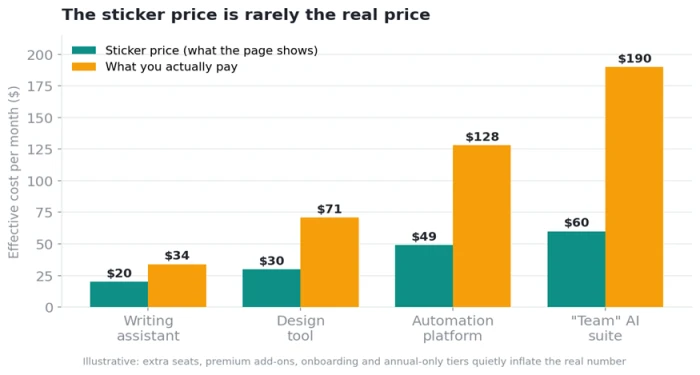
The advertised price and the real price are often two very different numbers.
Scan for the usual suspects: per-seat pricing, usage caps that trigger overage fees, features paywalled a tier above the one you saw, and "billed annually" prices dressed up as monthly ones. None of these are dealbreakers but you want to know before, not after.
4. Will this genuinely save me more than it costs?
Here’s the friendly math, no MBA required. Roughly how much time does this save you each week? Multiply that by what your time is worth. If a tool saves you three hours a week and those hours are worth more than the subscription, it pays for itself easily. If it saves you fifteen minutes on something you do twice a month maybe not.
And be honest about whether you’ll keep using it. A tool that’s amazing for the first week and then gathers dust is just a donation to the company. The best purchases are the ones that quietly become part of your routine.
5. Can I get my stuff back out if I leave?
This one’s easy to skip and painful to learn the hard way. If you pour months of work, content, or data into a tool, can you export it and walk away? Or is everything trapped inside their platform in a format only they can read?
Before you commit, find the export button. Check what formats you get back. A confident tool makes leaving easy because it’s betting you’ll want to stay. A tool that makes your data hard to retrieve is quietly holding you hostage and that’s worth knowing on day one, not day 300.
Rule of thumb If you can’t easily get your own work out, you don’t really own it. Look for the export option before you pay. |
6. Does it play nice with the tools I already use?
The most powerful AI tool in the world is annoying if it doesn’t fit into your day. Does it connect to the apps you already live in, your docs, your email, your spreadsheets, whatever runs your work? Or will you be endlessly copying and pasting between tabs, quietly undoing the time it was supposed to save?
Check for the integrations you care about specifically. "It has an API" is nice for developers; "it drops straight into the app I use every day" is what actually matters for the rest of us. A tool that fits your workflow beats a flashier one that fights it.
7. Who’s got my back when it breaks?
Everything works great in the demo. The real test is the Tuesday afternoon when it doesn’t. When something goes wrong, is there a real support team, or just a chatbot and a hopeful contact form? Is there documentation, a community, someone who answers?
And zoom out for a second: is this a stable company or a weekend project that might vanish in six months? AI tools appear and disappear fast. You don’t need them to last forever, but if you’re about to build a workflow around one, a little digging into how established and reliable they are will save you a nasty surprise later.
Green flags vs. red flags
A quick cheat sheet for what you’re hoping to see and what should make you pause.
| Red flags (slow down) | Green flags (good sign) |
|---|---|
| No free trial, or a trial that hides the real features | A genuine free trial on your own work |
| Pricing that only appears after a "contact sales" wall | Clear, upfront pricing with no surprises |
| "Billed annually" prices disguised as monthly | Honest monthly and annual options side by side |
| No obvious way to export your own data | One-click export in standard formats |
| Doesn’t connect to anything you already use | Integrates with your existing apps |
| Support is a chatbot and a silent inbox | Real docs, real humans, active community |
| Brand-new, anonymous, no track record | Established, transparent, clearly here to stay |
A few quick questions people always ask
Is it ever worth paying when there’s a free version?
Often, yes, if the paid version removes a real limit that’s slowing you down (usage caps, missing features, no support). The trick is to hit the ceiling of the free version first, so you know exactly what you’re paying to unlock.
How long should I trial something before buying?
Long enough to use it on at least one real, meaningful task, not just poke around. If a week goes by and you keep reaching for it naturally, that’s your answer. If you forget it exists, that’s also your answer.
Monthly or annual plan?
Start monthly, even if annual is cheaper. Pay the small "flexibility tax" until you’re sure this is a keeper. Once a tool has earned a permanent spot in your routine, switching to annual for the discount makes sense.
What if I buy it and regret it?
Check the refund and cancellation terms before you pay, that’s part of question three. And set a calendar reminder a few days before any renewal, so an unused subscription can’t quietly roll over for another year.
The 5-minute pre-purchase checklist
Before you tap "subscribe," run down this list. Every box ticked? Go for it. A few blanks? Sleep on it.
☐ I can name the exact task this tool is solving for me.
☐ I’ve tried it on my own real work, not just the demo.
☐ I know the real, fully-loaded yearly cost, not just the sticker price.
☐ The time or money it saves clearly beats what it costs.
☐ I can export my own data and leave whenever I want.
☐ It connects to the tools I already use every day.
☐ There’s real support, and the company looks here to stay.
☐ I’ve checked the cancellation terms and set a renewal reminder.
The bottom line The best AI tool isn’t the one with the flashiest demo, it’s the one that quietly earns its place in your week and lets you leave anytime. Ask these seven questions, trust your gut, and you’ll spend on the tools that actually pull their weight. |