You booked the demo, started the trial, and then life happened. Two weeks later the tool auto-renewed, or the trial expired and you still had no idea whether it was any good. If that sounds familiar, you are not alone. The average company now runs roughly 106 software applications, and studies suggest nearly half of those licenses sit unused for 90 days or more. A lot of that waste starts at the evaluation stage, where nobody ever really put the tool through its paces.
Here is the good news. You do not need two weeks to know if a tool is worth your money. You need about 30 focused minutes and a plan. Research on trial behaviour backs this up: most people who abandon a free trial decide in the first 24 to 72 hours, and one report found that more than 98% of users who have not felt real value within two weeks are gone for good. In other words, the verdict happens early whether you organise it or not. This guide gives you a structured half-hour test drive you can run on almost any tool, so that early verdict is a good one instead of a guess.
The short version Minutes 0-5: Sign up and get to the dashboard. Note every point of friction. Minutes 5-15: Do the one job you actually came to do, start to finish. Minutes 15-22: Test integrations, imports and exports with your real data. Minutes 22-26: Push the edges. Try to break it and see how it fails. Minutes 26-30: Check pricing, support and your gut. Score it and decide. |
Why 30 Minutes Is Enough
Thirty minutes sounds too short to judge a serious tool. In practice it is plenty, for three reasons.
You are testing fit, not mastery. You are not trying to become an expert. You are answering one question: does this tool do my specific job well enough to switch to it? That question has a fast answer.
The best products are built to prove value fast. Good software is designed so a new user hits the first real result quickly. If a tool needs hours of setup before it does anything useful, that is itself a finding worth recording.
Your attention is the scarce resource. A focused 30-minute session where you actually do the work beats a two-week trial where you log in once, poke around and forget. Data shows users who touch core features in their first three days convert at around four times the rate of those who do not. Concentrated effort wins.
The method below is deliberately time-boxed. Set a timer. When a phase ends, move on even if you are not finished, because running out of time in a phase is a signal too.
The 30-Minute Clock at a Glance
Before the step-by-step, here is how the half hour breaks down. The two middle phases carry the most weight, because doing your real job and moving your real data are what separate a demo from a decision.
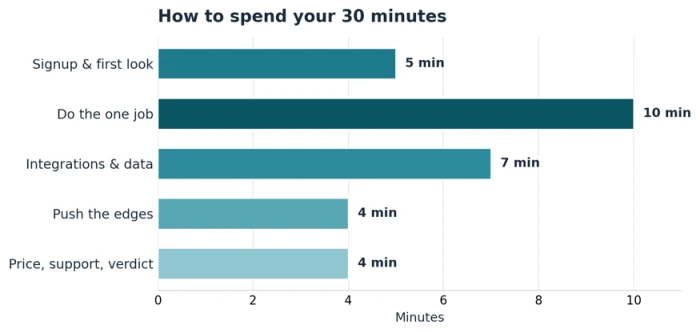
Figure 1: Suggested time split across the five phases of a 30-minute test drive.
| Time | Phase | The one question it answers |
|---|---|---|
| 0-5 min | Signup and first look | How much friction is there before I see anything useful? |
| 5-15 min | Do the one job | Can it actually do the main task I came here for? |
| 15-22 min | Integrations and data | Does it fit the tools and data I already have? |
| 22-26 min | Push the edges | How does it behave when I do something awkward? |
| 26-30 min | Price, support, verdict | Is it worth the money, and can I get help when stuck? |
Before You Start: Two Minutes of Prep
The test drive works only if you know what you are testing for. Spend two minutes, ideally before the clock starts, getting these three things ready.
Write down your one core job. One sentence, in plain language. "Turn a folder of receipts into a monthly expense summary." "Schedule a week of social posts across three accounts." This is the task you will run in the main phase, so make it real and specific.
Bring real sample data. A genuine CSV, a real PDF, an actual set of contacts. Fake data hides the problems that matter, like a broken import or a mangled export. Use something close to what you would use on day one.
List your must-have integrations. Note the two or three tools this app has to play nicely with, such as your email, your storage, or your accounting software. A tool that cannot connect to your stack is a no, no matter how pretty it is.
Keep a scratchpad open Open a blank note next to the tool. Every time something impresses you, confuses you, or annoys you, jot one line. You will not remember these moments later, and they are exactly what you will weigh when you score the tool at the end. |
Minutes 0-5: Signup and First Impression
The first five minutes are about friction. You are watching how the tool treats a brand-new user, because that tells you how the whole product is built.
What to do
- Sign up and time how long it takes to reach a usable screen.
- Notice whether it demands a credit card, a sales call, or a mountain of form fields before you see anything.
- Look at the empty state. Does it guide you toward a first action, or dump you into a blank dashboard and wish you luck?
- Find the search bar, the help link, and the main menu. Can you tell where things live?
What good looks like
A strong tool gets you to a meaningful screen in a couple of minutes, offers a sample project or a guided first step, and does not hold basic features hostage behind a sales team. If you feel lost in the first five minutes, that feeling rarely improves, so mark it down.
Red flags in the first five minutes Forced sales call just to try a self-serve product. A wall of setup before the tool does anything at all. No sample data or template, so you cannot see it working without building everything yourself first. Confusing navigation where you cannot find the main feature you came for. |
Minutes 5-15: Do the One Job
This is the heart of the test drive, and it gets the most time on purpose. You are going to complete your one core job from start to finish, using your real sample data. Not a tutorial, not a canned example, your actual task.
What to do
- Run your core job end to end. Import the data, build the thing, produce the output.
- Resist the urge to read every menu. Follow the shortest path to a finished result.
- Notice where you get stuck, where you have to guess, and where the tool does something clever you did not expect.
- Get to a real output: an exported file, a published post, a saved report. Something you could actually hand to someone.
Why this matters most
Anyone can make a dashboard look good in a screenshot. The question is whether the tool can carry your specific work from raw input to finished output without fighting you. Reaching that first real result is the moment a trial either clicks or quietly dies. If you hit it inside ten minutes, that is a very strong sign. If ten minutes pass and you are still wrestling with setup, that is a finding, not a failure on your part.
The traffic-light check When your ten minutes are up, give the core job a colour: Green: I finished the job and it felt natural. Amber: I finished, but it was clunky or I needed help. Red: I could not finish in the time, or the output was wrong. |
Minutes 15-22: Integrations, Imports and Exports
A tool never lives alone. It has to hand data to the other tools you use, and take data from them. This phase checks whether it fits your world or forces you to rebuild it.
What to do
- Try connecting one must-have integration from your prep list. Note whether it is native, needs a third-party connector, or is not possible at all.
- Import a real file and check that nothing breaks. Watch for scrambled columns, dropped rows, or broken formatting.
- Export your result and open it somewhere else. A tool that traps your data is a long-term risk, even if today it works fine.
- Check whether it works on the devices you need, such as mobile or a browser extension, if that matters to you.
| Test | Green light | Walk away if |
|---|---|---|
| Connect a key app | Native, one-click connection | No connection, or a paid add-on just to link basics |
| Import your data | Clean import, nothing lost | Columns scrambled or rows silently dropped |
| Export your work | Open standard like CSV, PDF, or an API | Locked in, or export hidden behind a higher tier |
| Use where you work | Works on your devices and browsers | Desktop-only when you need mobile, or vice versa |
Minutes 22-26: Push the Edges
Everything works in the happy path. Real work is not the happy path. Spend four minutes trying to trip the tool up, because how software fails tells you as much as how it succeeds.
What to do
- Feed it something messy: a malformed file, an odd character, a much bigger dataset than the demo used.
- Undo something. Delete something and try to recover it. See whether mistakes are forgiving or fatal.
- Do the thing the marketing page promised and check it holds up under a real example, not the cherry-picked one.
- Watch the error messages. Are they clear and helpful, or cryptic codes that leave you stranded?
You are not trying to be cruel. You are checking that when something goes wrong, and it will, the tool tells you what happened and helps you fix it. Cryptic failures now become support tickets later.
Minutes 26-30: Price, Support and the Verdict
The last four minutes are about the things that bite you after you have committed: what it really costs, and whether help exists when you are stuck.
What to do
- Read the pricing page properly. Find the plan you would actually be on, and check what your must-have features cost. Watch for per-seat pricing, usage caps, and features locked to the top tier.
- Search the help centre for the trickiest thing you did today. Good docs are a sign of a healthy product.
- Note the support channels. Live chat, email, community forum, or nothing? And is support gated to expensive plans?
- Check the cancellation and data-export terms so you know you can leave cleanly if you need to.
Watch for the total cost, not the sticker The headline price is rarely the real price. Add up per-seat costs for your team, usage overages, required add-ons for your must-have features, and any annual-only commitment. A cheap-looking tool can end up costing more than an all-inclusive rival once you add the pieces you actually need. |
Turn Your Notes Into a Decision: The Scorecard
You now have a scratchpad full of impressions. Turn it into a number so you can compare tools fairly instead of going on the most recent feeling. Score each category from 1 to 5, multiply by its weight, and add it up. The weights matter: time-to-value and core-workflow fit decide most of the outcome, which matches what the research says about why trials succeed or fail.
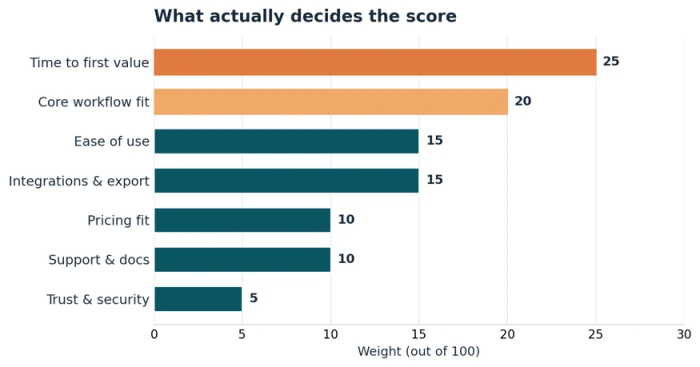
Figure 2: Suggested scorecard weights. The first two categories carry nearly half the total.
| Category | Weight | Ask yourself |
|---|---|---|
| Time to first value | 25 | How fast did I reach a real result? |
| Core workflow fit | 20 | Did it do my one job well? |
| Ease of use | 15 | Could I work without constant help? |
| Integrations and export | 15 | Does it fit my existing stack and free my data? |
| Pricing fit | 10 | Is the real, all-in cost reasonable for me? |
| Support and docs | 10 | Can I get unstuck when it matters? |
| Trust and security | 5 | Do I trust it with my data? |
A weighted score above roughly 4.0 out of 5 is a strong yes. Between 3.0 and 4.0, it is a maybe worth a second, deeper session or a comparison against one rival. Below 3.0, keep looking. The exact cut-off is yours, but writing the number down stops a slick onboarding flow from outweighing a tool that cannot actually do your job.
A quick worked example
Say you tested a scheduling tool. It got you started in three minutes (time to value: 5), nailed your posting workflow (fit: 5), felt a little cluttered (ease: 3), connected to your accounts natively but exported awkwardly (integrations: 4), sat in your budget (pricing: 4), had solid docs (support: 4) and reasonable security (trust: 4). The weighted maths lands at about 4.4 out of 5, which is a clear yes, with the one caveat to double-check the export before you rely on it.
Common Test-Drive Mistakes to Avoid
- Reading instead of doing. Watching the intro video and clicking around menus feels productive but tells you almost nothing. Do your real job with real data or the test does not count.
- Testing the demo data. The sample project is tuned to look perfect. Your messy CSV is the real exam.
- Judging on looks. A beautiful interface that cannot finish your task is worse than a plain one that can.
- Forgetting the exit. Always check you can export your data and cancel cleanly before you commit. Getting in is easy; getting out is where tools trap you.
- Skipping the price fine print. The plan you demo is often not the plan you would pay for. Price the features you actually need.
Adapting the 30 Minutes to Different Tools
The five phases stay the same, but where you spend the weight shifts with the type of tool.
| Tool type | Where to spend extra attention |
|---|---|
| AI or content tool | Test output quality on your real prompts and edge cases; check for accuracy, tone and how it handles things it does not know. |
| Data or analytics tool | Focus hard on import and export; make sure it reads your real files and gives data back in a usable form. |
| Team or collaboration tool | Invite a second person if you can; a lot of the value only shows up with more than one user. |
| Automation tool | Spend more time on integrations; the whole point is connecting your other apps, so a missing connector is disqualifying. |
| Mobile-first app | Run the core job on the actual device you will use, not just the desktop preview. |
The Takeaway
A tool is worth your time only if it does your job, fits your stack, and costs what it should. You can check all three in half an hour if you go in with a plan: know your one job, bring real data, run it end to end, push the edges, and score what you find. Skip the two-week trial guilt. Set a timer, do the work, write the number down, and decide.
Do this a few times and the method becomes second nature. You will spot a bad fit in the first five minutes and confirm a good one before the coffee goes cold, which is exactly how buying software should feel.