Free, Freemium and Paid AI tools are not really split by features. They are split by how you pay. Free tools cost you data, ads and strict limits. Freemium tools are free to start, then push you to upgrade. Paid tools cost money, and give you better models, more privacy and real support in return. This guide explains what each one really costs, with 2026 prices, so you can pick the right one for the job.
The short version
- Free costs you in data, ads and tight limits. It is good for trying things out, not for heavy work.
- Freemium is free to start, but the best features sit behind a paywall. Only about 2 to 5% of free users ever pay, so the limits are there to push the rest to upgrade.
- Paid costs money, about $20 a month for the big tools, and gives you the newest models, higher limits, more privacy and support.
- Most people use free. In fact, 91% use the free version of popular AI apps.
- Paying usually pays off. On average, companies get about $3.70 back for every $1 spent on AI. The real question is simply whether you use it enough.
| What you compare | Free | Freemium | Paid |
|---|---|---|---|
| Headline cost | $0 | $0 to start | ~$20/mo and up |
| You actually pay with | Data, ads, your time | Friction + upgrade pressure | Money |
| AI models | Older or smaller | Core model, limited | Newest / flagship |
| Usage | Tight daily caps | Usable core, capped extras | High or unlimited |
| Privacy | Weakest; inputs may train models | Mixed | Strongest; opt-outs and controls |
| Support | Forums and docs | Basic | Priority or dedicated |
| Best for | Trying it, light tasks | Regular light-to-moderate use | Daily, professional, team work |
The Three Models
Free means $0 with no paid version to upgrade to. You pay instead with your data, your attention, or your own effort. Freemium means the free plan is really just the first step toward a paid one. It is useful on purpose, and limited on purpose. Paid means you buy the full thing: a subscription, pay-as-you-go API, or a company plan.
This matters because most big AI tools are not truly free. They are freemium. Their free plan exists to turn some users into paying ones, and that is the reason behind every limit you hit.
What you're actually paying for
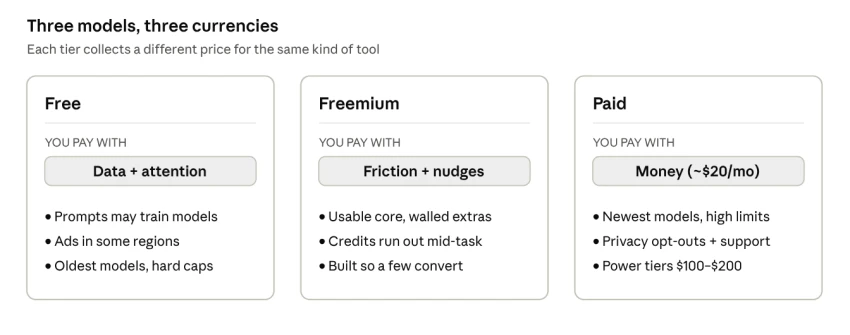
Every option has a price. The only question is how you pay it.
Free: You pay with data, ads and limits. A free plan is there to get you in the door, not to be charity. The company makes its money back in a few ways. Your chats can be used to train the model. Your attention is sold to advertisers, and OpenAI started showing ads in the US free tier of ChatGPT in February 2026. And the limits are tight enough that heavy users feel them. Free plans also tend to use older or smaller models, so the answers are often a step below the paid ones.
Freemium: You pay with friction. Freemium is free, but built to sell you something. The free plan is good enough to pull you in, and limited right where it counts. A credit runs out mid-task. A faster model is there to try but not keep. An export sits behind an "Upgrade" button. The aim is for a small number of users to pay. Across software, only about 2.6% of free users ever upgrade, and the best products reach 6 to 8%. The friction you feel is on purpose.
Paid: You pay with money, and get more back. A paid plan turns that hidden cost into one clear monthly fee. ChatGPT Plus, Claude Pro and Google AI Pro (once called Gemini Advanced) all cost about $20 a month. For that you get the newest models, much higher or unlimited use, better privacy (your data can be kept out of training), faster replies and real support. Heavy-use plans run from about $100 to $500 a month, depending on the tool.
So "free" is never really zero. You just pay in data, patience and lower quality instead of cash. Whether that is cheaper than $20 depends on how much you use the tool.
Features and Limits, Tier by Tier
The difference between tiers is mostly about where each one stops. Free gives you a taste. Freemium gives you a working version with walls. Paid takes the walls down.
| Capability | Free | Freemium | Paid |
|---|---|---|---|
| Flagship models | Rarely; older or smaller default | Flagship, but rate-limited | Full access to the newest models |
| Usage | Tight daily or message caps | Generous core, metered extras | High or effectively unlimited |
| Response speed | Lowest priority, slows at peak | Standard | Priority, fastest at peak |
| Advanced tools (deep research, image and video, voice, agents) | Minimal or none | A sample, capped | Full suite, highest limits |
| Integrations and API | None | Limited | API access and app connectors |
| Data privacy | Inputs may train models | Mixed; some opt-outs | Strongest controls and opt-outs |
| Team features | Individual only | Individual only | Shared workspaces, admin controls |
| Support | Community forums and docs | Basic help | Priority or dedicated |
| Typical cost | $0 | $0, then ~$20/mo to unlock | ~$20/mo; power tiers $100 to $500 |
Pricing Structures and Real 2026 Prices
These tools charge in a few ways: a free plan plus flat monthly fees, pay-as-you-go API pricing, per-person team plans, and custom company deals. For most people, it comes down to three choices: a free plan, a $20 main plan, and $100 to $500 heavy-use plans.
| Tool | Free tier | Standard paid | Power tier | Teams |
|---|---|---|---|---|
| ChatGPT | $0 (ads in US, flagship model, tight caps) | Plus $20/mo | Pro $100, $200 or $500/mo | Business $25 or $125/seat |
| Claude | $0 (limited usage) | Pro $20/mo (~$17 billed annually) | Max $100 or $200/mo | Team ~$25 to $30/user/mo |
| Google Gemini | $0 (Flash models only) | AI Pro $19.99/mo (+5 TB storage) | AI Ultra up to $249.99/mo | Workspace add-on |
There is also pay-as-you-go API pricing, where you pay per use instead of a flat fee. It suits apps and big or uneven workloads more than everyday chat. Company plans add custom prices and extra security. Prices change often. OpenAI's late-September 2026 update, for instance, added a new $500 ChatGPT tier. So check each one before you buy: OpenAI, Anthropic and Google.
When does Free stop being Cheaper?
The sticker price hides the real trade-off. A free plan looks free until you add up the time lost to limits, redoing work and buying extra credits. On the chart below, the $20 plan is a flat line. The real cost of staying free keeps rising. Where they cross is the point where paying is actually cheaper.
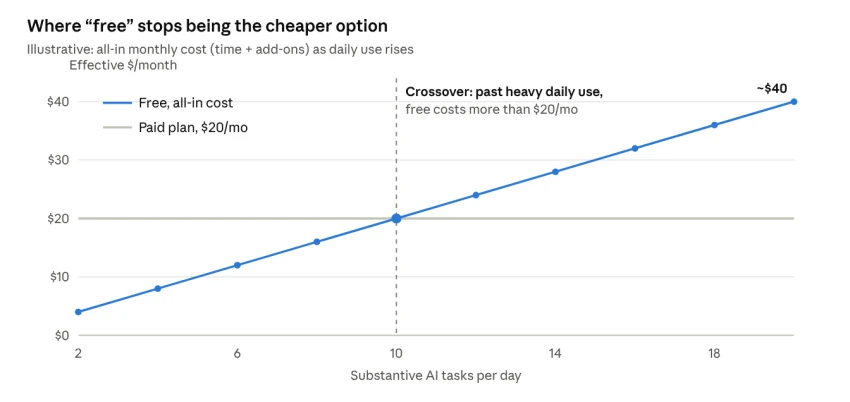
Where exactly they cross depends on your work, but the pattern holds: light users really do win with free, while heavy daily users end up paying more in time and hassle.
The True Cost of Free
The price tag says $0, but that is not the full bill. The costs below never show up on a receipt, and for serious work, just one of them can cost more than a year of paying.
| Hidden cost | What it looks like | Why it matters |
|---|---|---|
| Your data as fuel | Prompts and uploads may train or improve the model | Confidential or client data can enter a system you do not control; 75% of customers worry about AI data security |
| Attention and ads | Free tiers now carry ads in some regions | Your focus becomes the product being sold |
| Quality tax | Older or smaller models, more errors, more rework | Time lost re-prompting and fact-checking quietly offsets the $0 price |
| Usage cliffs | Caps that land mid-task | Broken workflows, waiting for resets, lost context |
| Switching costs | Chats, prompts and habits locked to one tool | Moving later costs time; the free on-ramp doubles as a lock-in strategy |
| Compliance gaps | No security certifications, data residency or audit logs | A dealbreaker in healthcare, finance and legal work |
For casual use, none of this matters much. But the moment you type in anything private, or the work is for a client or brand, "free" starts to look costly. With data-breach costs at record highs, according to IBM, the privacy risk is real.
How to Choose: A 30-Second Decision
You do not need to overthink this. Run the job through a few questions, from the top down, and stop at the first match. Privacy comes first, then how often you use the tool, then how heavy that use is.
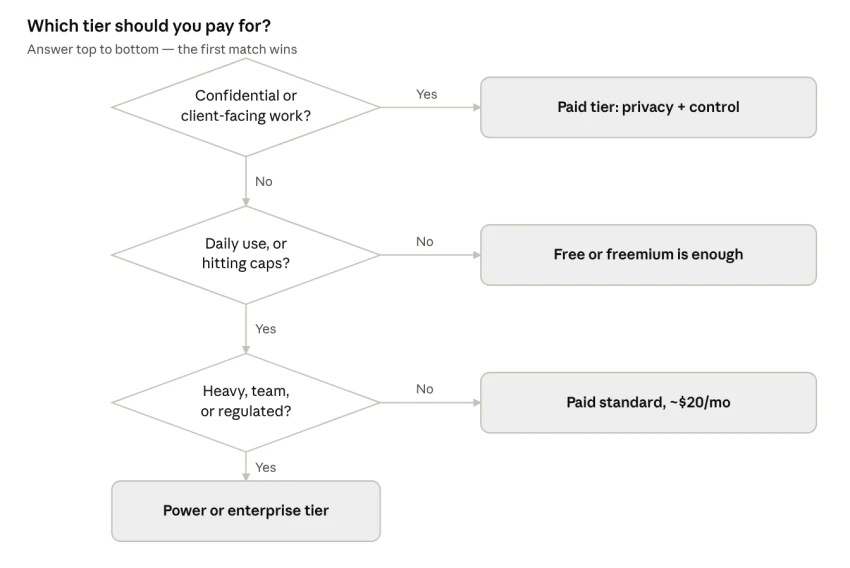
Most people end up with either free or the $20 plan. Team use and regulated work are what usually justify moving up to the bigger plans.
The bottom Line: Match the tier to the value
There is no single best tier. There is only the best one for the job. What matters is not the price. It is how much the tool is worth to you each month.
A quick test: guess how many hours a paid plan saves you each month, and multiply by what your time is worth. Then add the value of better results and more privacy. If that beats about $20, paying is the cheaper option. On average, AI returns about $3.70 for every $1 spent, so most regular users pass this test easily. The bigger picture is just as large: McKinsey estimates AI could add $2.6 to $4.4 trillion to the world economy each year.
A simple approach works for most people and teams:
- Start free to learn the tool and see if it fits.
- Switch to paid once limits, quality or privacy start costing you time.
- Keep free tools for small, low-risk tasks, even after you pay for your main one.
- Save the $100+ and company plans for heavy, daily or regulated work.
So the rule of thumb is easy. Use free to try a tool out. Use freemium to decide if it is worth paying for. And once you rely on it, pay for it.