Every AI tool writes well. None of them write like you. That is the core problem I kept running into when I started using AI for content. The output was clean, grammatically perfect, and completely forgettable. It read like it could belong to any company in my industry. And content that could belong to anyone builds equity for no one.
Training an AI tool on your brand voice is not about making the machine "creative." It is about feeding it enough of your real patterns that the output starts to carry your fingerprint. The tone, the rhythm, the vocabulary choices, the way you open a paragraph or close a post. I have spent months figuring out what actually works in this process, and all of these are learnable patterns once you know how to present them to the AI.
In this article, I am walking you through the full process I use. Not theory. Not a list of prompts to copy-paste. A working method you can apply today to any AI writing tool, whether that is ChatGPT, Claude, Jasper, or a dedicated brand voice platform.

What Brand Voice Actually Means (In Terms AI Can Learn)
Brand voice is not a mood board or a set of adjectives like "friendly" and "professional." Those words mean nothing to an AI model because they describe feelings, not patterns. AI learns from patterns.
Here is what brand voice breaks down into when you translate it for machine learning:
Tone register: the spectrum from casual to formal, from warm to authoritative. Not just one word. Where exactly on that spectrum do you sit? A founder writing on LinkedIn sits in a different spot than a SaaS company writing documentation.
Sentence structure: do you write short, punchy sentences? Or do you build longer, layered sentences with multiple clauses? Do you mix both? The rhythm of your sentences is one of the strongest signals of voice.
Vocabulary density: do you use industry jargon freely or do you default to plain language? Do you define terms or assume the reader knows them?
Opening patterns: how do you start a piece of content? With a question? A bold claim? A story? A data point? Your hook style is a consistent pattern, even if you have never named it.
Formatting habits: paragraph length, use of bullet points, how often you bold text, whether you use subheadings or write in long-form blocks.
Closing patterns: do you end with a call to action, a question back to the reader, an observation, or just stop?
Cultural markers: regional language patterns, code-switching between languages, references to specific communities or contexts.
When you feed samples to an AI tool, it is extracting all of these dimensions simultaneously. The quality of those samples determines the quality of the extraction. This is why the training process matters more than the tool you choose.
The Step-by-Step Training Process
Step 1: Build Your Voice Sample Library
If I had to pick the single most important input in this entire process, it is the quality of your samples. Not the quantity. Not the prompt. The samples.
Pull together 10 to 20 pieces of your best existing content. "Best" means two things here:
It performed well. High engagement, strong conversion, lots of shares or saves. The audience responded to it.
It sounds like you. If someone read it without seeing your name, they would still know it was yours. The voice is distinctly present.
Include variety in your sample set:
Mix short-form and long-form pieces
Include different content types (social posts, articles, emails, ad copy)
Cover different topics so the AI learns your voice, not just your vocabulary on one subject
Avoid these in your sample set:
Ghost-written content that does not reflect your natural style
Content older than 12 months (your voice has likely shifted)
Pieces where you were deliberately writing outside your normal tone (guest posts in someone else's style, formal press releases if that is not your usual register)
From my experience, five samples is the bare minimum. Ten to twenty is the productive range. Going past thirty gives diminishing returns because the AI starts averaging across too many signals.
Step 2: Choose Your Training Method
Not all AI tools handle voice training the same way. I have tested multiple approaches and there are three levels of setup that I have seen work:
Dedicated voice-training platforms (tools built specifically for brand voice like Jasper Brand Voice, Writer, or similar products): you upload your samples, the tool generates a voice profile automatically, and every piece of content it produces from that point forward is filtered through that profile. This is the lowest-effort, highest-consistency option.
LLM project spaces (ChatGPT Projects, Claude Projects, Gemini Gems): you create a dedicated project or workspace, paste your samples into the knowledge base or custom instructions, and every conversation in that project inherits the voice context. This requires slightly more setup than dedicated tools but gives you more flexibility.
In-context prompting (any AI chat tool): you paste samples directly into the conversation along with your request. This works but has two limits. The samples get pushed out of the context window in long conversations. And you have to repaste them every time you start a new session.
For brands producing content regularly, I strongly recommend the first or second method. The investment pays back within the first week.
Step 3: Write an Explicit Voice Guide
Samples teach the AI your patterns through example. But a written voice guide anchors the edge cases that samples alone do not cover. Think of it as the rulebook that fills the gaps between examples.
A good voice guide is 4 to 7 bullet points. Not a 20-page brand book. Not a paragraph of adjectives. Specific, behavioral instructions.
Example of a strong voice guide:
Warm but grounded in data. Never corporate-stiff, never slangy.
Short paragraphs. One to three sentences max. Single-sentence paragraphs are fine.
Use specific numbers and examples ("the 12-person team" not "a small team").
First-person singular for personal content, first-person plural for company content.
No more than one emoji per post. Zero is also fine.
End with an insight or a question. Never a generic call to action like "Let me know your thoughts!"
Mirror the audience's language. If they say "clients" say "clients," not "customers."
Paste this guide alongside your samples in whatever tool you are using. The combination of examples plus rules gives the AI two complementary reference points.
Step 4: Generate in Batches and Calibrate
This is where I see most people go wrong, and where I went wrong early on too. They generate one piece of content, tweak it manually, and move on. That is editing, not training.
Real calibration happens when you generate 3 to 5 variations of the same brief at once. Here is why:
Variation reveals patterns. When you see five versions side by side, the voice inconsistencies become obvious. One version might nail the tone but miss the vocabulary. Another might have the right structure but sound too formal. The comparison teaches you what the AI is getting right and what it is missing.
Accept/reject builds signal. Every time you pick one version over the others, you are telling the AI (directly in tools with feedback loops, or indirectly through your continued refinement) what "right" sounds like for your brand.
Speed improves fast. The first batch might produce zero usable pieces. By the tenth batch, you should be getting 2 to 3 out of 5 that need only minor editing.
Aim for 20 to 30 total generations in the first week. Not 20 to 30 published pieces. 20 to 30 attempts where you actively compare, select, and provide feedback. By generation 30, the voice should be landing consistently. By generation 100, the model has a near-complete picture of your patterns.
Step 5: Edit the Last 20 Percent by Hand
Even with excellent training, I never let AI output go out untouched. The target is not zero editing. The target is reducing editing from 20 minutes per piece to 5 minutes per piece.
Your job in the editing pass is to add what the AI cannot generate on its own:
Personal references the AI does not know about (a conversation you had, a specific customer story, an observation from your day)
Timing sensitivity that connects the content to something happening right now in your industry or audience
The one sentence that sounds so distinctly like you that no model could have written it
This is not a flaw in the process. This is the process working correctly. I have come to see AI as my writing partner, not my ghostwriter. It handles the 80 percent that is pattern-based. I contribute the 20 percent that makes it human.
Common Mistakes and How to Fix Them
Mistake 1: Using too few samples or the wrong ones
If the AI output sounds generic despite training, the problem is almost always in the sample set. I learned this the hard way. Three to four samples are not enough for the model to distinguish your voice from its default. Samples that were written by someone else, or that represent a tone you no longer use, actively train the model in the wrong direction.
Fix: Go back to Step 1. Rebuild the sample set with 10 to 15 pieces that genuinely represent how you write today. Prioritize recent, high-performing content.
Mistake 2: Writing vague voice instructions
Telling the AI to be "engaging and professional" gives it nothing actionable. Those words describe 90 percent of the content on the internet. The model cannot differentiate your voice from anyone else's based on generic adjectives.
Fix: Rewrite your voice guide using behavioral instructions. Instead of "be engaging," write "open every LinkedIn post with a one-sentence observation from personal experience." Instead of "professional tone," write "no slang, no exclamation marks, contractions are fine."
Mistake 3: Training on one format and expecting it to work across all formats
If you only feed the AI your LinkedIn posts, it will not know how to write your email newsletters or your ad copy. The model cannot extrapolate your voice into formats it has never seen examples of.
Fix: Include 2 to 3 samples per content format in your training set. If you write across five platforms, your sample set should cover all five. Short-form and long-form need separate representation.
Mistake 4: Skipping the batch generation step
Generating one piece at a time and manually fixing it is what I used to do too. It is also the least effective approach for voice training. You end up doing all the voice work yourself, every single time. The AI never improves because it never gets comparative feedback.
Fix: Always generate in batches of 3 to 5. Compare the outputs. Select the best one. This comparative process is what teaches the model your preferences across many dimensions at once.
Mistake 5: Never refreshing the training data
Your voice is not static. I have noticed that the way I write in October is different from how I wrote in January. New products, new audiences, and new formats all shift your natural patterns. Training data that is 6 months old starts producing output that sounds like a slightly outdated version of you.
Fix: Every 90 days, audit your training set. Replace 2 to 3 of the oldest samples with newer content. Update your voice guide if your style or preferences have changed. This quarterly refresh keeps the AI aligned with who you are now, not who you were.
Mistake 6: Context window overflow in long conversations
If you are using in-context prompting (pasting samples directly into the chat), your voice instructions get pushed out of the model's memory as the conversation grows longer. The AI reverts to its default voice and you wonder why it suddenly forgot everything.
Fix: Use project-level or profile-level voice training that persists across conversations. If you must use in-context prompting, start a fresh conversation for each new piece of content instead of continuing a long thread.
How to Know the Training Is Working
Voice training is not a one-and-done task. I always tell people they need a way to measure whether the AI is actually getting closer to their voice over time, or just producing polished noise.
Three signals that training is landing:
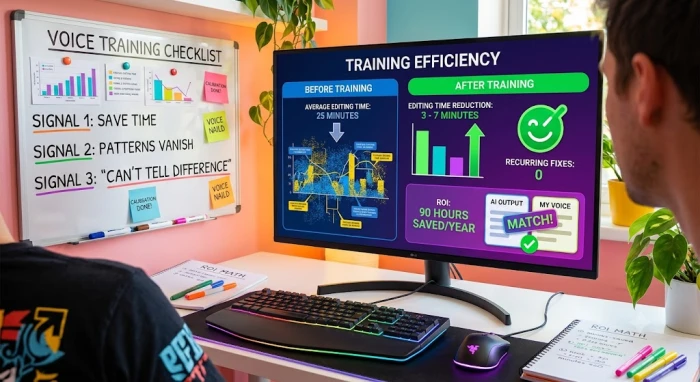
1. Editing time drops measurably. Before voice training, most people spend 15 to 25 minutes editing each AI-generated piece to make it sound right. After proper training, that number should fall to 3 to 7 minutes. If you are still rewriting 50 percent of the output after 30 generations, something in your training setup needs to change.
2. You stop rewriting the same things. In early generations, you will notice recurring patterns you keep fixing. The AI uses words you would never use. It structures paragraphs in a way that does not match your style. It opens with a generic hook when you always open with a specific one. After calibration, those recurring fixes should disappear. If the same correction keeps showing up, your samples or your voice guide are not addressing that specific dimension.
3. Other people cannot tell the difference. The real test is whether someone who knows your writing can distinguish between your AI-assisted content and your fully manual content. If they cannot, the voice training is working. If they immediately spot the AI pieces, you have more calibration to do.
Let me share the math on ROI because it is straightforward. A creator publishing 7 pieces of content a week who reduces editing time from 20 minutes to 5 minutes per piece saves roughly 105 minutes a week. Over a year, that is about 90 hours. The upfront investment is 1 to 2 hours of sample curation plus the ongoing 5-minute editing pass per piece. The return is visible within the first 30 days.
My Take on AI Voice Training
I will be honest. When I first started using AI for content, I was skeptical that any tool could genuinely learn a brand voice. I thought it was marketing fluff from AI companies trying to sell subscriptions. I was wrong.
After months of testing, refining, and watching the output improve generation after generation, I can say with confidence that AI voice training works. But only if you treat it as a process, not a shortcut.
Here is my honest feedback on the current state of AI voice training in 2026:
The tools have gotten significantly better in the last year. Dedicated voice-training platforms now produce output that is genuinely close to your real voice after just 10 to 15 calibrated generations. That was not the case even 12 months ago. The improvement is real and measurable.
But no tool eliminates the need for human editing. I have tried every major platform. Every single one still produces output that needs a human pass before it goes live. The difference is that the editing went from "rewrite this from scratch" to "change two sentences and we are good." That shift alone changed my content workflow entirely.
The biggest lesson I have learned is that the quality of your training inputs matters more than the quality of the tool. I have seen people get better results from a free ChatGPT account with 15 excellent samples than from an expensive dedicated platform with 3 mediocre samples. Your samples are the real product. The AI is just the engine.
My advice to anyone starting this process: do not overthink the tool selection. Pick one, commit to the 5-step process I outlined above, and give it 30 generations before you judge the results. The first 10 will feel rough. The next 10 will surprise you. By the third batch, you will wonder how you ever wrote content without this.
AI voice training is not the future of content. It is the present. The brands and creators who figure this out now will have a compounding advantage over those who keep writing everything manually. Not because the AI is better than them. Because the AI frees them to focus on the work that actually requires a human brain.
That is my take. I am all in on this process, and I think you should be too.