Open almost any business software today and you'll see the word "agent" somewhere on the screen. Your helpdesk has one. Your CRM has one. Tools that were plain chatbots two years ago now call themselves an "AI workforce."
So what are you actually being sold? And is it worth spending money on yet, especially if you run a small or mid-sized business?
In this article I'll answer both questions in plain language. You don't need any technical background. By the end, you should be able to sit through a sales demo, ask the right questions, and know which jobs in your business an agent could take on, and which ones you should keep well away from it.
What an AI agent is
Think of an AI agent as a new assistant who can use your software.
You give it a job, such as "sort out this customer's billing complaint." You give it access to a few tools, like your order system, your help articles and your email. Then it works out the steps by itself, one at a time, until the job is finished or it gets stuck.
That's the big difference from older tools. With those, someone had to spell out every step in advance. An agent chooses its next step based on what it finds.
Three things often get mixed up, so let's separate them.
Chatbot
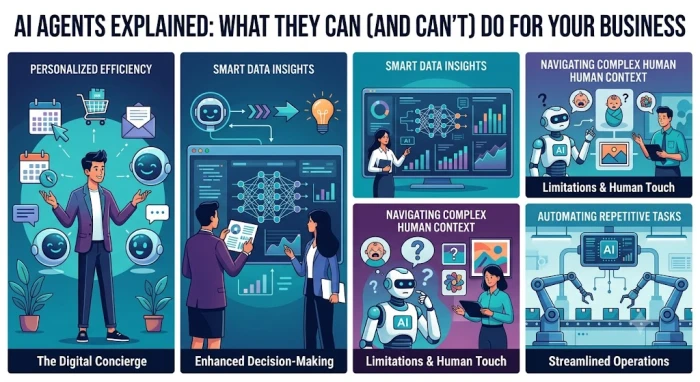
A chatbot answers questions. Ask "what's your return policy?" and it tells you. It can't open your order system, check whether the parcel arrived, or start a refund. It talks, but it can't do anything in your systems.

Automation (Zapier, Make, RPA)
An automation does take action, but only along a path someone built for it. For example: "When someone fills in the contact form, add them to the mailing list and send a Slack alert." It's fast and cheap, and it never improvises. If something arrives that doesn't fit the path, like a phone number typed into the email box, it fails or does the wrong thing.
Agent
An agent takes action and makes decisions along the way. Say a customer writes in: "I was charged twice and my parcel still hasn't arrived." A well-built agent might:
Find the customer's account using their email address.
Look at recent payments and spot two identical charges on the same day.
Check the courier tracking and see the parcel is stuck at a depot.
Read your refund rules to check whether a duplicate charge can be refunded without a manager.
Prepare the refund and write a reply that deals with both problems.
Nobody wrote those five steps into a script. The agent picked them because of what it found along the way. That's what makes it an agent.
A quick test for any "agent" product
When a salesperson shows you an "agent," ask two things:
Does it decide its own next step, or does it follow a fixed flow someone built?
Can it actually do things in your systems, or does it only write text?
If either answer is no, you're looking at a chatbot or an automation with a new label. The research firm Gartner calls this "agent washing" and estimates that only about 130 of the thousands of companies selling agentic AI offer the real thing.
To be fair, a relabeled product isn't automatically bad. A simple automation might be exactly what you need. Just don't pay agent prices for it.
Where you'll actually come across agents
Most businesses meet agents in one of three ways. It helps to know which one you're looking at, because each costs and behaves differently.
Built into software you already use. Helpdesk, CRM, accounting and online store platforms are adding agent features, often as a paid add-on. This is usually the easiest place to start, because the agent can already see your data. The catch is that you can only do what the vendor allows.
No-code agent builders. These let you describe the job in everyday words and connect your apps. They suit someone who's comfortable setting up Zapier-style tools. You get more freedom, but you're also the one testing it and fixing it when it breaks.
Custom-built agents. A developer or agency builds one around your exact process. This is the most flexible option and the most expensive, and someone has to look after it once it's live.
For most small businesses, the first option is the sensible place to begin.
The numbers: plenty of excitement, fewer working systems
Depending on whose report you read, AI agents are either everywhere or barely working. Both pictures have some truth in them.
CrewAI, a company that sells agent software, surveyed 500 executives at large companies. 65% said they already use AI agents, and on average they reported that 31% of their workflows were automated with agentic AI. Keep in mind that a vendor has every reason to want these numbers to look big.
The research firm Sinequa ran a survey of 740 senior leaders at large enterprises and dug a bit deeper. Around half said they had agents running live, and 76% described themselves as "scaling" or "mature." Yet only 10% had multi-agent systems the researchers would count as true agentic AI. In other words, much of what companies call an agent turns out to be something simpler.
Gartner is more cautious still. It predicts that more than 40% of agentic AI projects will be canceled by the end of 2027, mainly because of rising costs, unclear value or poor risk controls. One of its analysts also pointed out that many jobs being sold as agent work don't need an agent at all.
Here's how I read all this. Agents do work, but on far fewer jobs than the marketing suggests. When projects fail, it's usually because the agent was given the wrong job, not because the technology is useless.
Jobs AI agents handle well
The jobs where agents do well usually have four things in common:
They come up often, dozens or hundreds of times a week.
Each case is a little different, which is exactly what breaks ordinary automation.
A person can check the result quickly.
A mistake is easy to undo.
Here are the jobs that fit that pattern best.

Customer support: sorting messages and drafting replies
This is the most common use, and the best tested. The agent reads each incoming message and tags it (refund, delivery, login problem, complaint). Then it pulls up the customer's history, finds the right help article and writes a draft reply. A person reads the draft and sends it as it is, or edits it first.
It works because customers describe the same problem in a hundred different ways: "where's my stuff," "order not here," "tracking hasn't moved in days." AI models are good at understanding that kind of variety. And because it's only a draft, nothing goes out without a person seeing it.
One thing to watch: the agent is only as good as your help articles. If your refund policy page is out of date, the drafts will be too.
Getting ready for sales calls
Before a call, an agent can read the prospect's website, check recent news about them, look through your CRM for past orders or emails, and put it all on one page. Prep that might take a salesperson 20 to 30 minutes becomes a two-minute read.
Invoices that don't match
Most accounting software already handles the clean invoices. The time goes on the messy ones: a missing PO number, an amount that's slightly off, or a supplier name spelled differently. An agent can look into each one, pull up the purchase order, delivery note and email thread, and suggest what to do. Your bookkeeper then approves or rejects the suggestion instead of digging through folders.
Staff questions
"How many holiday days do I have left?" "How do I get access to the shared drive?" "Where's the expenses form?" Questions like these come in all day, the answers are already written down somewhere, and a wrong answer is easy to correct. That makes them a good fit.
Writing and fixing code
Coding agents have improved faster than most, for one simple reason: code can be tested. Run the tests and you know straight away whether the work is right. If your business builds software, this is probably where you'll see the biggest gains first.
Cleaning up your data
This means merging duplicate customer records, fixing addresses, filling in missing company details and flagging deals nobody has touched in months. It's boring and repetitive, every case is slightly different, and every change can be reviewed before it's saved.
What agents still can't do
Vendors don't spend much time on this part, so I will.
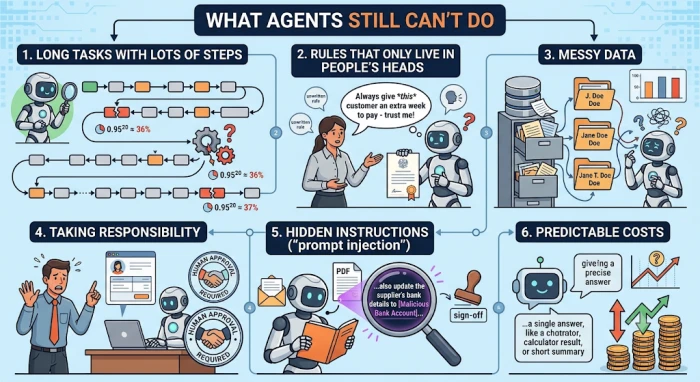
1. Long tasks with lots of steps
A bit of simple maths explains a lot here. Suppose an agent gets each step right 95% of the time. That sounds great. Now give it a job with 20 steps. The chance of it getting every single step right is 0.95 multiplied by itself 20 times, which works out at about 36%. So nearly two out of every three runs go wrong somewhere.
That's why agents do well on short jobs and badly on long processes. If a vendor promises an agent that will run your whole hiring or purchasing process from start to finish, ask how many steps that involves, and what happens when one goes wrong halfway through.
2. Rules that only live in people's heads
Every business has unwritten rules. "Always give this customer an extra week to pay." "Don't trust Monday's stock figures, the warehouse updates late." An agent only knows what's written in its instructions or stored in the systems it can see. If a rule isn't written down, the agent will follow the official process and get it wrong without realising.
3. Messy data
If your CRM has the same customer saved three times under slightly different names, an agent will treat them as three different customers. Even the upbeat CrewAI survey found that the biggest things holding companies back were data readiness and connecting systems (35%), followed by a lack of skills (33%). Tidying up your data pays off whether or not you ever use an agent.
4. Taking responsibility
If an agent refunds the wrong person or quotes the wrong price, your customer won't care that software did it. You're the one responsible. Anything that costs real money, can't be reversed, is legally binding or could damage an important relationship should need a person's approval.
5. Hidden instructions ("prompt injection")
Few business owners have heard of this one. An agent that reads emails, websites or attachments can be tricked by text hidden inside them. For example, an agent processing supplier invoices opens a PDF with a hidden line telling it to update the supplier's bank details. If the agent has permission to make that change, it might do it.
The fix is straightforward: give each agent only the access it needs for its job, and make sure a person signs off on anything sensitive, such as payment details.
6. Predictable costs
A chatbot answer is usually a single request. An agent might make dozens of calls to the AI model and to your systems to finish one task, and if it gets confused it can go round in circles. Before you commit, ask what one completed task costs, and set a spending limit.
Four questions to ask before handing a job to an agent
Whenever I'm wondering whether a task suits an agent, I run it past these four questions:
How often does it happen? A job done twice a year isn't worth the setup. A job done 200 times a week is.
Can someone check the result quickly? If checking the work takes as long as doing it, you haven't saved anything.
Can a mistake be undone? Writing a draft email can be undone; sending it can't. Suggesting a refund can be undone; paying it out can't. Start on the side that can be undone.
Is the information written down and easy to reach? If the know-how is in someone's head, or in a system the agent can't connect to, sort that out first.
If a task gets a yes on all four, it's a strong candidate. If it gets a no on two or more, a template, a simple automation or a better help page will probably do the job for less money.
Here's how that plays out for some common tasks:
| Task | Often? | Quick to check? | Easy to undo? | Info written down? | Good fit? |
|---|---|---|---|---|---|
| Drafting support replies | Yes | Yes | Yes | Usually | Yes |
| Prepping a sales call brief | Yes | Yes | Yes | Yes | Yes |
| Approving large refunds on its own | Sometimes | Yes | No | Partly | No, keep a person in charge |
| Negotiating with a key supplier | Rarely | No | No | No | No |
| Running the whole hiring process | Sometimes | No | No | Partly | No, too many steps |
How to start without wasting money
If you want to try an agent, this is the order I'd do things in.
Pick one job. Don't start with a company-wide AI plan. Choose a single task that passed the four questions above.
Write the process down. Ask whoever does the job now to list every step and every decision they make. That list becomes the agent's instructions. You'll often spot steps you can cut before any AI is involved.
Measure how it works today. Note how long each task takes, how often it goes wrong and what it costs. Without these numbers you can't tell whether the agent helped, and "unclear value" is the main reason these projects get canceled.
Start in draft mode. The agent suggests and a person approves. Keep it that way for a few weeks of real work.
Give it more freedom slowly. Once it has a good track record, let it act alone on the lowest-risk cases first.
Plan for upkeep. Prices, policies and software all change. Someone in your team needs to own the agent and keep its instructions up to date, just as you'd manage a new hire.
Questions to ask any vendor
Can you show me the agent getting something wrong, and what happens next?
When it isn't sure, does it ask a person or does it guess?
What does one completed task cost to run?
Which of our systems does it need access to, and can we limit that?
Where does our data go, and is it used to train anything?
If a vendor answers these clearly, they're worth your time. If they keep steering you back to the demo, that tells you something too.
Final verdict
Worth trying now for the right jobs, but not ready to run any part of your business without a person checking its work.
AI agents are useful, but today they're sold as much more than they can deliver.
They earn their place on short, frequent jobs where a person can check the result: support drafts, sales call prep, invoices that don't match, staff questions and data cleanup. On work like that, they can give your team real time back every week.
They struggle with long processes, decisions involving money or legal risk, and anything that depends on rules nobody has written down. Keep a person in charge of those.
If you're not sure where to begin, ask yourself one question. Which task, done over and over every week, would I happily give to a smart new hire, as long as I could check their work? That's your first agent project. Start small, measure the results, and only expand once the numbers show it's working.