Introduction
AI writing tools have moved from novelty to daily infrastructure for a lot of people who write for a living. Bloggers use them to get past the blank page, marketers use them to produce a dozen ad variations in one sitting, and freelancers use them to tighten drafts before sending work to a client. The core problem they solve is time. A first draft that once took two hours can take ten minutes, and the human effort shifts toward editing, fact-checking, and adding the judgment that a model does not have.
That shift is also where the risk sits. These tools produce fluent text with equal confidence whether the underlying claim is true or not, and they will happily generate a bland paragraph that reads like a thousand other bland paragraphs. So when I compare AI writing software, I look at more than word count per dollar. The questions that matter are what the tool is built to do, how much free usage you get before paying, whether the pricing is per person or per team, what integrations fit your existing workflow, how the vendor treats your data, and how much editing the output needs before it is publishable.
This guide covers ten tools that most writers will run into. Four are general-purpose assistants (ChatGPT, Claude, Google Gemini, Notion AI), two are grammar and rewriting specialists (Grammarly, QuillBot), and four are marketing or SEO-focused content platforms (Jasper, Copy.ai, Writesonic, Rytr).
Quick comparison table
All prices are in US dollars and reflect the lowest-cost individual paid tier. Annual prices are shown as the monthly equivalent.
| Tool | Best use | Key features | Free access | Starting paid price | Official website |
|---|---|---|---|---|---|
| ChatGPT | General drafting, research, brainstorming | GPT models, projects, deep research, voice, agent mode | Free plan | $20/month (Plus) | openai.com/chatgpt |
| Claude | Long-form drafting, editing, nuanced writing | Large context, Projects, artifacts, document analysis | Free plan | $20/month, $17 annual (Pro) | claude.com |
| Grammarly | Grammar, clarity, tone correction | Real-time corrections, tone detection, browser and app plugins | Free plan | $12/month annual (Pro), unconfirmed | grammarly.com |
| Jasper | Brand-consistent marketing copy | Brand voice, campaigns, templates, team workflows | 7-day trial, no free plan | $59/seat/month annual (Pro), unconfirmed | jasper.ai |
| Copy.ai | Sales and marketing workflows | Workflow automation, brand voice, GTM integrations | Free plan (limited) | $49/month (Starter), unconfirmed | copy.ai |
| Writesonic | SEO content and articles | SEO article writer, keyword tools, Chatsonic | Free trial | $39/month annual (Lite), unconfirmed | writesonic.com |
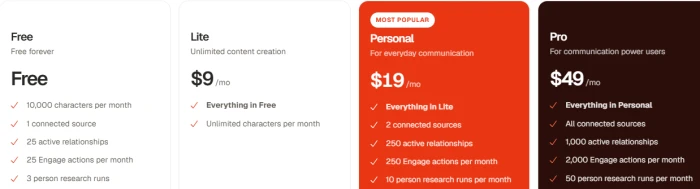
| Rytr | Budget short-form copy | 40+ templates, tone options, browser extension | Free plan | $7.50/month annual (Unlimited), unconfirmed | rytr.me |
| QuillBot | Paraphrasing and rewriting | Paraphraser, summarizer, grammar checker, citation tool | Free plan | $4.17/month annual (Premium), unconfirmed | quillbot.com |
| Google Gemini | Writing inside Google Workspace | Gmail and Docs integration, deep research, large context | Free plan | $19.99/month (Google AI Pro) | gemini.google |
| Notion AI | Writing inside a team workspace | Inline drafting, summaries, Q&A across your Notion pages | Trial usage on free plan | $20/user/month annual (Business), unconfirmed | notion.com |
Individual tool reviews
1. ChatGPT
Overview. ChatGPT is the most widely used general-purpose AI assistant and the tool most writers try first. It is not built specifically for writing, but its models handle drafting, outlining, rewriting, and summarizing well, and the surrounding features (projects, memory, file uploads, deep research) make it a capable writing workspace.
Main features
- Multiple GPT models with reasoning modes for complex tasks
- Projects for grouping chats and files around one piece of work
- Deep research for sourced reports, with allowances that vary by plan
- Voice mode, image generation, custom GPTs, and agent mode on paid tiers
- Connectors to common cloud drives and work apps on Business plans
Pricing and plans (USD)

Pros
- Strong all-round drafting and idea development
- The free plan is usable for light writing work
- Wide ecosystem of integrations and third-party guides
Cons
- No annual discount on individual plans
- Output can drift toward generic phrasing without careful prompting
- Usage caps on Plus are easy to hit during heavy research sessions
Ideal users. Writers who want one general tool for drafting, research, and brainstorming rather than a specialist platform.
2. Claude
Overview. Claude, built by Anthropic, has a reputation among writers for producing prose that reads more naturally and for handling long documents without losing the thread. It is a general assistant like ChatGPT, but its strengths line up closely with long-form writing and editing.
Main features
- Large context window for working with full manuscripts, reports, or research packs
- Projects for persistent instructions, style guides, and reference files
- Artifacts for editing documents side by side with the conversation
- File and image analysis, web search, and document creation on paid plans
Pricing and plans (USD)

Pros
- Natural writing style with less filler than many competitors
- Handles long inputs and multi-document editing well
- Annual discount on the individual plan, unlike ChatGPT
Cons
- Fewer consumer extras (no image generation, lighter voice features)
- Smaller third-party template and plugin ecosystem
- Free plan usage limits are modest during busy periods
Ideal users. Long-form writers, editors, and anyone who wants an AI collaborator for essays, reports, and manuscripts rather than quick marketing snippets.
3. Grammarly
Overview. Grammarly is not a drafting tool at heart. It is an editing layer that sits inside your browser, email client, and word processor, flagging grammar, clarity, and tone issues as you type. Generative features have been added, but correction remains the core product.
Main features
- Real-time grammar, spelling, and punctuation correction
- Clarity rewrites, tone detection, and full-sentence suggestions
- Generative AI prompts for drafting and rewriting within the same interface
- Works across Chrome, Microsoft Word, Google Docs, Gmail, and desktop apps
- Plagiarism checking and AI-detection style signals on paid plans
Pricing and plans (USD)

Pros
- Best-in-class for catching mistakes you would otherwise miss
- Works where you already write, with no copy-and-paste workflow
- Free tier covers basic correction indefinitely
Cons
- Monthly billing is expensive relative to the annual rate
- Generative features are weaker than dedicated assistants
- Suggestions can flatten a distinctive voice if accepted blindly
Ideal users. Anyone who sends a lot of email, publishes often, or writes in English as a second language.
4. Jasper
Overview. Jasper started as a template-driven copy generator and has repositioned itself as a marketing content platform. The emphasis now is on brand voice, campaign workflows, and team governance rather than one-off blog posts.
Main features
- Brand voice and style guide enforcement across outputs
- Campaign tools for generating coordinated assets
- Marketing templates, a browser extension, and image generation
- Team permissions and shared workspaces on higher tiers
Pricing and plans (USD)

Pros
- Strong brand-consistency controls for teams producing lots of copy
- Purpose-built templates for ads, email, and social
- Marketing-specific onboarding and documentation
Cons
- Expensive for an individual writer compared with a $20 general assistant
- No permanent free tier
- Output quality depends on the same underlying models competitors use
Ideal users. Marketing teams that need consistent voice across many contributors.
5. Copy.ai
Overview. Copy.ai has shifted from a simple copy generator toward a sales and marketing workflow platform, with automation that chains multiple prompts together. The writing tools remain, but the product is increasingly aimed at go-to-market teams.
Main features
- Workflow builder for repeatable multi-step content tasks
- Brand voice and tone controls
- Integrations with CRMs and marketing tools
- Chat-style assistant for one-off drafts
Pricing and plans (USD)

Pros
- Workflow automation saves real time for repetitive campaign work
- Free plan is enough to test fit
- Sales enablement features that general assistants lack
Cons
- Pricing jumps steeply between tiers
- Workflow setup has a learning curve
- Less useful for pure writing tasks than it once was
Ideal users. Marketing and sales teams running repeatable content pipelines.
6. Writesonic
Overview. Writesonic has positioned itself around SEO content. Its article writer pulls in keyword and competitor data and produces structured drafts intended to rank, alongside Chatsonic for conversational work.
Main features
- AI article writer with keyword research and SERP analysis
- SEO checker and optimizer for existing content
- Chatsonic assistant with web access
- Bulk generation and publishing integrations
Pricing and plans (USD)

Pros
- Keyword and SERP data built into the drafting flow
- Reasonable starting price for an SEO-focused platform
- Publishing integrations with WordPress and similar platforms
Cons
- Credit-based limits can run out quickly on long articles
- Generated articles still need substantial human editing
- No guarantee that optimized content will rank
Ideal users. Bloggers and content marketers producing high volumes of search-targeted articles.
7. Rytr
Overview. Rytr is the budget option. It offers a simple template interface for short-form copy such as product descriptions, email replies, and social captions, and it is priced well below everything else here.
Main features
- 40+ use-case templates
- 20+ tone settings and 30+ languages
- Browser extension and basic plagiarism check
- Custom tone matching on the Premium plan
Pricing and plans (USD)
Pros
- Lowest price in the group
- Simple enough to use productively within minutes
- Free plan is adequate for occasional short copy
Cons
- Limited for long-form work
- Output is more formulaic than frontier assistants
- Fewer integrations and collaboration features
Ideal users. Solo freelancers and small shops that need quick short copy on a tight budget.
8. QuillBot
Overview. QuillBot is known for its paraphrasing tool, and that remains its best feature. It bundles a summarizer, grammar checker, citation generator, and translator into a lightweight package aimed at students and writers who rework existing text.
Main features
- Paraphraser with multiple modes (standard, fluency, formal, creative, and more)
- Summarizer, grammar checker, and translator
- Citation generator and plagiarism checker on Premium
- Chrome, Word, and macOS extensions
Pricing and plans (USD)

Pros
- Inexpensive annual plan
- Fast rewriting with fine control over how much changes
- Useful free tier
Cons
- Rewrites can introduce subtle meaning changes
- Weak for original drafting
- Paraphrasing is not the same as original work, and some academic contexts treat it as a problem
Ideal users. Students, editors, and writers who frequently rework or condense existing material.
9. Google Gemini
Overview. Gemini is Google’s general assistant, and its main writing advantage is where it lives. It is built into Gmail, Docs, and the rest of Workspace, so drafting an email or restructuring a document happens without leaving the page.
Main features
- Side-panel assistance in Gmail, Docs, Sheets, and Slides
- Large context window for long documents
- Deep research and file analysis on paid plans
- NotebookLM and Google One storage bundled with paid tiers
Pricing and plans (USD)

Pros
- Seamless for people already working in Google Workspace
- Competitive price for a bundle that includes storage and research tools
- Strong multilingual support
Cons
- Writing style tends toward the safe and generic
- Less compelling outside the Google ecosystem
- Feature availability varies by region and account type
Ideal users. Teams and individuals who draft most of their work in Gmail and Google Docs.
10. Notion AI
Overview. Notion AI is not a standalone writing tool. It is an assistant inside the Notion workspace, so its value depends on whether your notes, docs, and project pages already live there. Its strongest use is drafting and summarizing in context, with access to everything else in your workspace.
Main features
- Inline drafting, rewriting, and translation on any Notion page
- Summaries of pages, meeting notes, and databases
- Q&A that searches across your workspace and connected tools
- Meeting notes and transcription features
Pricing and plans (USD)

Pros
- No context switching for teams already in Notion
- Workspace-wide search and summarization is a real time saver
- Collaboration is native rather than bolted on
Cons
- Full AI access requires the Business tier, which is pricey for a solo user
- Writing quality is adequate rather than exceptional
- Pointless if your team does not use Notion
Ideal users. Teams who manage documentation and projects in Notion and want AI help without leaving it.
Conclusion
The strongest options break down cleanly by job. ChatGPT and Claude are the best general drafting and idea-development tools, with Claude ahead on long-form prose and ChatGPT ahead on breadth of features. Grammarly is the clear choice for clarity, grammar, and tone. QuillBot handles rewriting at a low price. Writesonic serves SEO-driven content, and Jasper and Copy.ai suit marketing teams that need consistency and workflow automation. Gemini and Notion AI are the right picks when your work already lives in Google Workspace or Notion.
In my opinion, the best AI writing tool depends on what you want to achieve. After comparing these tools, I believe ChatGPT and Claude are strong choices for drafting and developing ideas, while Grammarly is useful for improving clarity, grammar, and tone. Jasper and Copy.ai may be worth considering for marketing teams, whereas QuillBot is a practical option for rewriting and paraphrasing.
I would recommend trying the free versions or available trials before paying for a subscription. Some tools may work well for everyday writing, while others offer more value for specific professional tasks. I also believe that no AI writing tool should be trusted blindly. The content still needs human review, fact-checking, and editing to make it accurate and natural.
Overall, my recommendation is to choose a tool that fits your actual workflow and budget rather than simply following popularity or paying for features you may never use.