A year ago, the common advice was to pick one AI platform and stay inside it. That advice is changing. Across freelancers, small teams, and large enterprises, a growing number of people now run several AI tools side by side and wire them together into a stack they control, rather than living inside a single vendor's suite. The scale of adoption is part of the reason. McKinsey's global survey puts organizations using AI in at least one business function at 78% in 2025, up from 72% in early 2024, while Stanford's 2026 AI Index reports that generative AI reached 53% population adoption within three years, faster than the PC or the internet.
Once you use AI daily, you start to notice where any one platform falls short. This article breaks down why the do-it-yourself stack is spreading, what the trade-offs are, and how to decide between assembling your own and consolidating on one platform. It is written to be practical, so you can act on it whether you run a two-person team or a large function.
The short version People build their own stacks for five reasons: no single platform is best at every task, lock-in is risky when models change fast, routing work across tools controls cost, sensitive data is easier to govern when you own the wiring, and the model market moves too quickly to bet on one provider. The catch is maintenance and complexity, which is why single platforms still win for many simple, low-volume use cases. |
What a Self-Built AI Stack Actually Means
A single-platform approach means most of your AI work happens inside one vendor's product, using that vendor's model, interface, and add-ons. A self-built AI tool stack means you pick a separate tool for each job and connect them, so the output of one becomes the input to the next. The word stack matters. You are not just using more tools, you are arranging them in layers that pass work between each other, often through an interface or router you control.
Here is the distinction in plain terms:
Single platform: one login, one model, one bill, one roadmap set by the vendor.
Self-built stack: several specialized tools, chosen for what each does best, joined so they work as one flow.
Most people who build a stack still buy the parts. Building your own stack rarely means coding models from scratch. It means owning the choices and the connections instead of renting them from one vendor whose priorities may not match yours.
The Shift in Numbers
The clearest signal is spending. AI is now the fastest-growing line item in software budgets, and the growth is not coming from one big purchase. It is coming from many separate tools accumulating across teams. CloudZero's 2026 State of AI Costs report found average monthly AI spend rose 36% in a year, from about $63,000 to $85,500. Cledara's platform data shows the number of AI subscriptions per business grew 84% year over year, with the average business paying for around 4.5 AI tools. Zylo's 2026 SaaS Management Index found spending on AI-native apps more than doubled, up 108%.
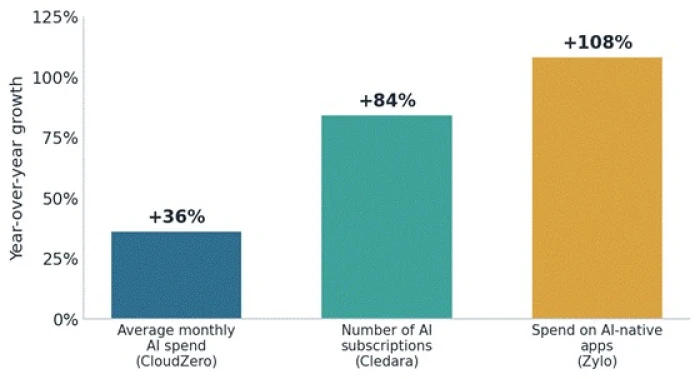
Year-over-year growth across three independent AI cost measures. Sources: CloudZero, Cledara, Zylo (2026).
Two patterns sit underneath those numbers. First, ChatGPT is now the most-expensed app inside the average US enterprise, ahead of AWS and Microsoft 365, according to Zylo's 2026 index, which tells you individual tool adoption is running ahead of central planning. Second, the average company runs roughly 275 to 305 SaaS applications overall, and a large share of AI purchases happen outside IT. People are assembling stacks whether or not anyone approved a strategy for it.
Reason 1: No Single Platform Is Best at Everything
This is the everyday reason, and the one most people feel first. Modern work is rarely a single task. Preparing a report might involve research, drafting, data analysis, image work, and a final layout. One model tends to lead on reasoning, another on writing tone, another on code, another on image generation. When you commit to one platform, you accept its weakest tool along with its strongest.
The result of staying inside one suite is not failure, it is friction. You spend time working around the parts that lag instead of picking the tool that already does the job well. People building stacks are optimizing for the best result per task, not the fewest logins.
Where this bites in practice
- A writer keeps one model for long-form drafts and a different one for punchy short copy, because tone quality differs noticeably between them.
- A developer routes code generation to a coding-specialized tool and keeps a general assistant for planning and documentation.
- A marketer uses a research tool for sourcing, a separate writer for drafts, and a dedicated image tool, because the all-in-one versions of each are weaker than the specialists.
Reason 2: Vendor Lock-In Is a Real Cost
Lock-in is the dependency you create when your workflows are built so tightly around one provider that leaving becomes expensive. It is easy to underestimate because it builds up quietly, one integration at a time. Analysts now treat AI providers as a fast-growing category of supply-chain risk, since the exposure includes price changes, outages, and even regulatory action you cannot control.
Lock-in is not one thing. It forms at four separate layers, and a plan that fixes only the easy one leaves you exposed on the rest.
| Layer | What gets locked in | Why it is hard to move |
| Model | Prompts and fine-tuning tuned to one model's behavior | Prompt chains optimized for one model do not transfer cleanly, so the work is repeated on the new one. |
| Data | Provider-specific embeddings and stored context | Vectors and indexes often have to be rebuilt from scratch in a new format. |
| API and tooling | Proprietary SDKs and agent frameworks | Orchestration logic coupled to one vendor is a development project to rebuild, not a setting to change. |
| Infrastructure | Single-hyperscaler hosting and services | Egress fees and re-integration make migration slow and costly. |
The four layers of AI vendor lock-in. Source: ADVISORI, Kong (2026).
A self-built stack pushes back on this directly. When each tool sits behind an interface or router you own, swapping one out is a change in configuration rather than a rebuild. That is the core appeal for anyone who expects the market to keep shifting, which the next reason makes clear.
Reason 3: Routing Work Across Tools Controls Cost
Running every task through one premium model is simple, and it is often the most expensive way to work. Not every job needs the top-tier model. A stack lets you send simple tasks to cheap or open models and reserve the expensive model for work that truly needs it. That routing is where a lot of the savings live.
The savings are measurable. Berkeley and LMSYS researchers behind RouteLLM reported that routing can cut cost dramatically, with up to 85% lower cost while holding roughly 95% of top-model quality on their benchmark, and typical production savings in the 30% to 40% range. The chart below shows what that does to relative cost.
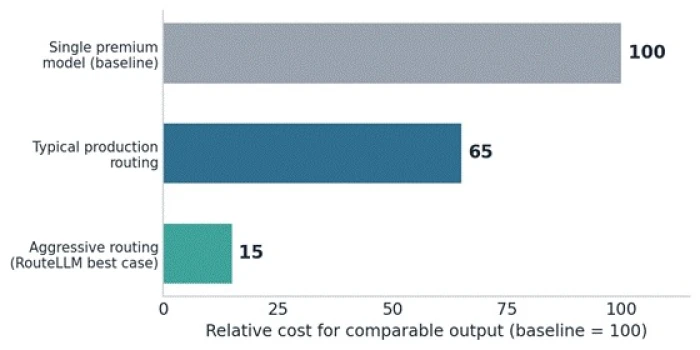
Relative cost for comparable output, baseline set to a single premium model. Source: RouteLLM (Berkeley/LMSYS), ADVISORI (2026).
There is a cost warning on the other side, though. The reason AI spend is climbing is not only more tools, it is pricing mechanics. Zylo found that most IT leaders reported surprise charges tied to usage-based and AI pricing, where a per-seat contract quietly becomes a per-token bill. A stack helps only if you watch usage. Routing without visibility trades one cost problem for another.
Reason 4: Data Control and Governance
With a single provider, your data flows to one vendor's infrastructure and sits under one set of terms. For narrow use that is fine. For sensitive work in finance, healthcare, or legal settings, concentrating all your data with one party is a risk in itself. If that provider has a security incident or changes how it handles data, your exposure is concentrated and your recourse is limited.
Owning the stack lets you keep sensitive steps on models or infrastructure you trust, including self-hosted open-weight models as a fallback, while still using hosted tools for lower-risk work. The governance gap is real, though. Deloitte's 2026 State of AI report found only about one in five organizations has a mature framework for governing AI agents, so building a stack without a governance plan can spread risk rather than contain it.
Reason 5: The Model Market Moves Too Fast to Bet on One
Foundation models are released and re-ranked on a timescale of weeks. Committing everything to one provider means you cannot easily adopt a better or cheaper model when it appears. The speed of change is the strongest argument for keeping your options open.
How fast can preference shift? Enterprise usage data shows how quickly the ground moves under a single-vendor bet.
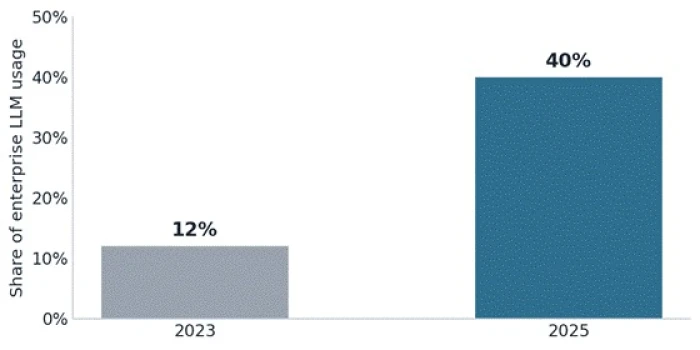
Anthropic's share of enterprise LLM usage, showing how fast model preference can shift. Source: enterprise LLM market data (2025).
A stack built around an abstraction layer, often called an AI gateway or model router, is designed for exactly this. Your application talks to the router, and the router decides which model handles each request. Open-source options such as LiteLLM make this the minimum viable version of multi-model flexibility. Open standards like the Model Context Protocol push in the same direction, lowering the cost of connecting new tools so switching becomes easier over time.
What a Self-Built Stack Looks Like
A stack is easier to picture as layers, each with a clear job. You do not need every layer on day one. Most people start with the top two and add the rest only when volume or complexity demands it.
| Layer | What it does | Common building blocks |
| Interface | Where you and the AI meet day to day | Chat apps, coding assistants, in-editor tools |
| Orchestration and routing | Decides which model or tool handles each step | AI gateways, model routers, workflow builders |
| Models | The engines that do the reasoning and generation | Hosted models from several providers, open-weight models |
| Tools and context | Connects models to your data and actions | Retrieval systems, MCP servers, connectors |
| Observability and cost | Shows what ran, what it cost, and what failed | Usage dashboards, tracing, logging |
| Governance | Keeps the stack safe and auditable | Access controls, guardrails, audit logs |
The common layers of a self-assembled AI stack. Synthesized from MindStudio, O'Reilly, and AI Multiple (2026).
The important shift over the past year is that the middle layers are getting easier. Provider SDKs are absorbing memory, tool calling, and basic evaluation, and shared standards are reducing the glue code you have to write. That lowers the effort of building a stack, which is part of why more people are doing it.
The Trade-Offs: Where a Single Platform Still Wins
A self-built stack is not automatically the right answer. It carries real costs, and honest planning means weighing them. Building your own MCP or orchestration layer internally comes with high up-front and ongoing effort and a maintenance burden that grows with every tool you add. There is also a genuine consolidation case: analyst data cited by CIO advisors suggests unified stacks can cut total cost of ownership by up to 36% and finish implementations faster, because there is less to integrate and maintain.
Here is the honest comparison.
| Dimension | Single platform | Self-built stack |
| Setup effort | Low, works out of the box | Higher, you connect the parts |
| Best-per-task quality | Limited to one vendor's range | You pick the best tool for each job |
| Cost at low volume | Often cheaper and simpler | Overhead can outweigh savings |
| Cost at high volume | Premium model on everything adds up | Routing can cut cost sharply |
| Lock-in risk | High, hard to leave later | Low if built behind a router |
| Maintenance | Vendor handles it | You own it, and it compounds |
| Data control | Concentrated with one vendor | You decide what runs where |
| Best fit | Simple, low-volume, general use | Specialized, high-volume, or sensitive work |
Single platform versus self-built stack across the decisions that matter.
How to Decide: Build a Stack or Stay on One Platform
Use volume, sensitivity, and specialization as your three tests. The more of these that apply to you, the stronger the case for a stack.
| If this is you | Start here | Why |
| Occasional user, general tasks | One platform | Overhead of a stack is not worth it yet |
| Daily user hitting quality gaps | Add one specialist tool | Fix the weak spot without a full rebuild |
| High and rising usage costs | Add a router or gateway | Send cheap work to cheap models |
| Sensitive or regulated data | Own the sensitive steps | Keep control of where data runs |
| Team depends on one vendor | Add an abstraction layer | Reduce lock-in before it deepens |
A quick build-versus-buy guide based on how you actually use AI.
A sensible order to build in
- Start where you feel friction. Add one specialist tool for the task your current platform handles worst.
- Put a router in front once you use two or more models. An AI gateway keeps your setup switchable and lets you route by cost.
- Turn on usage visibility early. You cannot control spend you cannot see, and AI pricing is now largely usage-based.
- Add governance before you scale, not after. Access controls and audit logs are far cheaper to add early than to retrofit.
- Keep an exit path for every tool. Favor tools that support open standards and clean data export.
Practical Takeaways
• A stack is a means, not a goal. The aim is the best result per task at a cost you can see, not the largest number of tools.
• Lock-in is cheaper to avoid than to escape. An abstraction layer added early pays off the moment a better model appears.
• Routing is where cost savings live. Reserve premium models for work that needs them and send the rest elsewhere.
• Visibility beats restriction. Watching usage controls AI spend better than blocking tools people will expense anyway.
• Single platforms are not the past. For simple, low-volume, general work, one good platform is still the efficient choice.