The 8 Best AI Presentation Makers
1. Gamma
Best for: Fast decks built from a prompt and shared as a live link.
Type: Generates complete presentations in its own web editor.
Overview
Gamma builds decks from "cards" instead of fixed 16:9 slides. Gamma 5, released October 6, 2026, rebuilt the AI agent and added a freeform editing canvas. It can also import existing PowerPoint and PDF files with their design kept.
Key Features
• Outline-first generation from a prompt or an uploaded file.
• Chat-based agent edits plus a freeform canvas for moving individual elements.
• Connectors for Slack and Notion, and deck creation from inside Claude and ChatGPT.
• Import from PDF and PPTX, and export to PDF, PPTX, PNG and Google Slides on every plan.
• Web publishing with per-viewer analytics on Pro.
Hands-on Experience
Gamma shows an editable outline before it designs anything, which makes it easy to fix the structure early. After generation, you can change it either by giving the agent a chat instruction or by editing the canvas manually. The free plan caps each generation at 10 slides; Plus and higher allow up to 100 slides per prompt.
Gamma's help center confirms that exports follow Present mode and that gradients and some styling can change in PowerPoint. PDF is the most faithful export.
Pricing

Pros
• Outline review before design prevents rework.
• The Gamma 5 canvas allows precise manual layout changes.
• Wide range of visual styles, so decks do not look like stock templates.
• Live links always show the latest version.
Cons
• PowerPoint exports need cleanup because cards do not map one-to-one onto slides.
• Editing needs an internet connection.
Verdict
The best all-round choice for decks built from scratch and shared by link. Not ideal when the final file must be a clean PPTX on a corporate template.
2. Beautiful.ai
Best for: Business teams that need consistent, on-brand decks.
Type: Generates complete presentations in its own editor.
Overview
Beautiful.ai generates decks using Smart Slides, layouts that re-flow automatically as content is added or removed, so alignment and spacing stay correct without manual adjustment.
Key Features
• Over 300 Smart Slide layouts.
• AI generation with extra context from uploaded files or links.
• Theme builder for colors, fonts, logos and footers.
• Editable PowerPoint import and export, plus PDF export and an offline desktop player.
• Team plan: locked slides and a shared slide library, with live data linking for charts.
Hands-on Experience
After generation, edits happen by adding or removing content rather than dragging boxes; adding a fourth item to a three-column layout re-flows the slide. Classic Slides, a blank mode without guardrails, covers slides that need a custom arrangement. Shared links include viewer analytics.
Pricing

Pros
• Slides stay aligned through every edit.
• Locked slides protect approved designs from accidental changes.
• Charts and data slides look finished without manual styling.
• Classic Slides mode for layouts outside the Smart Slide system.
Cons
• Smart Slide guardrails limit free placement of elements.
• Auto-layout stops working once a deck is exported and edited in PowerPoint.
Verdict
Right for teams producing client decks every week that must stay on-brand. Designers who want full layout freedom will prefer Canva or Gamma.
3. Canva
Best for: Students and small businesses that also create social graphics and documents.
Type: Generates complete presentations in its own design editor.
Overview
Canva's Magic Design for Presentations turns a short prompt into several draft decks. The chosen draft opens in the standard Canva editor with its full template and stock media library.
Key Features
• Magic Design draft decks from a prompt.
• Large template and stock library, much larger on paid plans.
• Brand Kits: one on Free (three colors only) and five on Pro, while Business allows 100 with approvals.
• PPTX and PDF download, in-app presenting and link sharing.
• Resize a deck into social posts and other formats.
Hands-on Experience
Magic Design focuses on layout and visuals, so slide text for detailed topics needs manual writing after generation. Every element can be moved freely in the editor. Canva's AI allowance is shared across all its AI tools. Fonts and effects specific to Canva can shift in PowerPoint exports.
Pricing

Pros
• Complete layout freedom with no guardrails.
• Decks, handouts, social graphics and video in one workspace.
• Deep stock media and template library.
• Familiar interface for existing Canva users.
Cons
• AI drafts need more writing for content-heavy decks.
• PowerPoint exports can shift Canva-specific fonts and effects.
Verdict
Best for people already designing in Canva. Those who want AI to handle structure and writing will get more from Gamma or Presentations.AI.
4. Pitch
Best for: Teams that build decks together and track client engagement.
Type: Generates complete presentations in its own collaborative editor.
Overview
Pitch combines an AI generator (Pitch Agent) with real-time co-editing. Tracked share links and "pitch rooms" bundle decks and files behind one link with engagement data.
Key Features
• Pitch Agent deck generation plus over 150 templates.
• Real-time co-editing with comments and slide assignment.
• Advanced links that track visits and time spent per slide (Team and above).
• PPTX import and a Pitch MCP server.
• Integrations with Google Sheets and HubSpot.
• Desktop and mobile apps with offline access.
Hands-on Experience
Several people can edit the same deck at once, assign slides and leave comments. The Free plan's 100 AI credits are a one-time allowance, so heavy AI use needs a paid plan. Free exports branded PDFs only; unbranded PowerPoint export starts on Plus.
Pricing

Pros
• Real-time co-editing with slide assignment.
• Slide-level analytics show which parts of a deck prospects read.
• Clean, modern templates for startup and sales decks.
• Offline access through desktop and mobile apps.
Cons
• AI editing is less deep than in AI-first tools.
• Teams that deliver PowerPoint files add an export step to every revision.
Verdict
The best pick for collaborative decks and sales follow-up. Solo users focused on AI generation will get more from Gamma.
5. Plus AI
Best for: PowerPoint and Google Slides users with existing templates.
Type: Add-in that works inside PowerPoint and Google Slides; no separate editor.
Overview
Plus AI generates native slides directly inside Google Slides or PowerPoint from a prompt or a document, and can rewrite or remix existing slides into new layouts.
Key Features
• Prompt-to-deck and document-to-deck generation inside both apps.
• Single-slide insertion and AI remix (for example, a paragraph into three columns).
• Document uploads and prompts over 100,000 characters on Pro and above.
• Custom branding on Team; custom templates with slide masters on Enterprise.
• MCP server and API for generating decks from ChatGPT or Claude (Pro and above).
Hands-on Experience
Plus AI opens as a side panel. A prompt or document produces an outline, then slides land in the open presentation as ordinary PowerPoint or Google Slides content, so no export or conversion is needed. Plus AI states that tasks use 40 to 170 credits each, so Basic's 1,500 monthly credits cover roughly 9 to 37 tasks.
Pricing

Pros
• Native PowerPoint and Google Slides output with no conversion damage.
• Remix restructures an existing slide without rebuilding it.
• One subscription covers both PowerPoint and Google Slides.
• MCP connector generates decks from inside ChatGPT or Claude.
Cons
• Designs stay within standard slide layouts and look more conventional than Gamma decks.
• No standalone editor or link-based presenting.
Verdict
The top choice when the deck must end as a clean PowerPoint or Google Slides file. Not the pick for striking, web-style visuals.
6. Microsoft Copilot in PowerPoint
Best for: Microsoft 365 subscribers and companies with approved PowerPoint templates.
Type: Built into PowerPoint; assists an existing PowerPoint workflow.
Overview
Copilot drafts a presentation inside PowerPoint from a prompt or a Word document, with speaker notes included. Work-license accounts can also start from a PDF.
Key Features
• Prompt-to-deck with an editable topic outline before slides are built.
• Create from a Word document; from a PDF with a Microsoft 365 Copilot work license.
• Follows the company template when the file starts from it or a .potx file.
• Speaker notes and deck summaries, plus a "Try a new design" restyle command.
Hands-on Experience
Copilot sits above the slide and in the Home ribbon. Create a presentation opens a prompt box and then an editable topic list, before a style or template is chosen. Output quality follows the template: a blank file produces plain slides. Microsoft's support pages show some options, such as length and tone controls, reaching Frontier and Insider users first.
Pricing

Pros
• Native PPTX from the start; no export step.
• Respects corporate templates and slide masters.
• Turns Word reports into decks.
• All standard PowerPoint tools available for fine-tuning.
Cons
• Slides look plain without a strong template.
• Features vary by license and rollout stage.
Verdict
A natural fit for anyone already paying for Microsoft 365. Others get more presentation-focused AI from Plus AI or Gamma.
7. Presentations.AI
Best for: Founders and sales teams creating business decks with engagement tracking.
Type: Generates complete presentations in its own editor.
Overview
Presentations.AI generates business decks from prompts or documents and applies brand colors and fonts automatically. Shared links track viewer engagement slide by slide.
Key Features
• Deck generation from a prompt, an outline, a URL or a document.
• Brand colors and fonts on every plan; custom templates on Gold.
• PowerPoint and PDF export on all plans.
• View and slide-level engagement analytics.
• Gold: project knowledge uploads and one-pass data refresh for existing decks.
Hands-on Experience
The free Starter plan caps decks at 20 slides and uses the standard AI model; Pro and Gold use advanced and frontier models, which the company ties to output quality and speed. It offers a Chrome extension and a ChatGPT plugin, but no PowerPoint or Google Slides add-in.
Pricing

Pros
• Brand styling applies automatically, even on the free plan.
• Converters for URLs, PDFs, Word files and Markdown.
• Slide-level engagement data for sales follow-up.
• Templates geared to pitch decks and reports.
Cons
• Free-plan output is not a reliable preview of Pro or Gold quality.
• No add-in for PowerPoint or Google Slides.
Verdict
A strong fit for solo founders and sales reps who want business-ready decks with analytics. Teams needing deep co-editing should choose Pitch.
8. SlidesAI
Best for: Students and teachers working in Google Slides on a budget.
Type: Add-in for Google Slides and PowerPoint, plus a standalone web app.
Overview
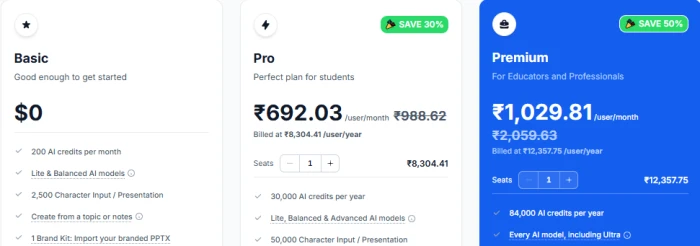
SlidesAI turns a topic, notes, a script or a document into slides inside Google Slides or PowerPoint, and also runs as a web app. Brand Kits import an existing branded PPTX template so output follows that design.
Key Features
• Text-to-slides from a topic or notes on all plans; script and document input on paid plans.
• Brand Kits: one on Free, three on Pro, six on Premium.
• PDF and Word uploads on Pro and Premium.
• AI model tiers from Lite and Balanced on Free up to Ultra on Premium.
Hands-on Experience
In Google Slides, SlidesAI opens from the Extensions menu. After choosing a slide count and style, slides appear in the open file and download as PPTX or PDF through Google Slides. Input is capped at 2,500 characters per presentation on Free, 50,000 on Pro and 100,000 on Premium.
Pricing
Pros
• Slides land directly in Google Slides.
• Brand Kit import follows a school or company template.
• Free credits refresh monthly.
• Minimal learning curve for Google Slides users.
Cons
• Design is limited to host-app layouts.
• Independent 2026 reviews rate the PowerPoint integration as less complete than the Google Slides add-on.
Verdict
A low-cost choice for Google Slides classrooms. Users who want standout design should look at Gamma or Plus AI.
Comparison Table
| Tool | Best For | Free Plan | PowerPoint Export | |
| Gamma | Quick, link-shared decks | Yes, 400 credits at signup | Yes, all plans (branding on Free) | |
| Beautiful.ai | On-brand business decks | Not available (14-day trial) | Yes, editable PPTX | |
| Canva | Students and all-round design | Yes, limited AI use | Yes | |
| Pitch | Team collaboration | Yes, up to 5 members | Paid plans only (Plus and up) | |
| Plus AI | PowerPoint and Google Slides users | Not available (7-day trial) | Native, works inside PowerPoint | |
| Copilot in PowerPoint | Microsoft 365 users | Not available | Native PowerPoint | |
| Presentations.AI | Business decks with analytics | Yes, 200 credits, 20 slides | Yes, all plans | |
| SlidesAI | Google Slides on a budget | Yes, 200 credits per month | Yes, via Google Slides download |

Which AI Presentation Maker Should You Choose?
• Best overall: Gamma. Outline-first generation plus the Gamma 5 canvas, with 400 free credits to start.
• Best for business presentations: Beautiful.ai. Smart Slides and locked slides keep every deck on-brand.
• Best for students: Canva. Free plan and a familiar editor, and K-12 schools get most premium features free. SlidesAI suits Google Slides classrooms, and Beautiful.ai is free for a year with a .edu email.
• Best for quick presentations: Gamma. One prompt gives a reviewable outline and a designed deck, shareable as a live link.
• Best for PowerPoint users: Plus AI. Native slides inside PowerPoint and Google Slides. Copilot is the alternative for existing Microsoft 365 subscribers.
• Best free option: Gamma. The free plan creates full decks and exports to PPTX and Google Slides, with Gamma branding. SlidesAI's free credits refresh monthly for lighter, regular use.
• Best for team collaboration: Pitch. Real-time co-editing and slide-level analytics on shared decks.
Final Verdict
Gamma is top pick for building decks from scratch: the outline step and the Gamma 5 canvas give speed and control together. Plus AI is the better buy when the deck must end as a clean PowerPoint or Google Slides file, since it creates native slides with no conversion step.
Beautiful.ai and Pitch win on team needs, brand consistency for the first and co-editing with engagement tracking for the second. Canva and SlidesAI are the low-cost options, and Copilot is worth it mainly for existing Microsoft 365 subscribers. The final choice comes down to workflow, design expectations, editing needs and budget, with output format as the deciding factor: a tool that exports the wrong format costs more time in cleanup than it saves in generation.