
VEED turns raw footage into captioned, social-ready videos through an accessible browser workspace built for quick production.
TurboScribe
AI transcription for uploaded recordings
Overview
What is TurboScribe?
Podcasters, researchers, and students use TurboScribe to turn long audio or video into accurate, editable text without installing software.
From file to working transcript
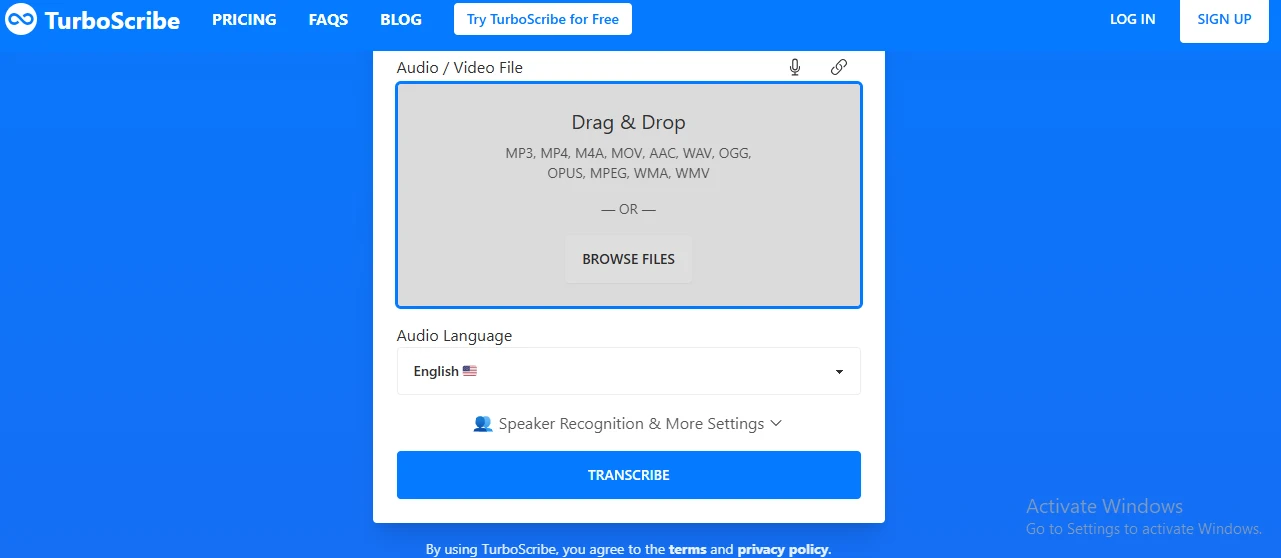
TurboScribe runs in the browser and accepts common audio and video formats. Before processing, you can set the spoken language, choose a recognition mode, and request speaker identification. Results arrive with timestamps and playback controls, making it practical to check uncertain passages rather than reread the entire document.
Where accuracy needs attention
Clean, close-mic speech generally produces dependable copy, even across lengthy interviews or lectures. Overlapping voices, distant microphones, specialized terminology, and proper names still require correction. Speaker recognition is helpful for conversations, but labels can switch when voices sound alike. It is built for uploaded files rather than joining calls or producing a live transcript during meetings.
Free access and Unlimited
| Plan | Key limits |
|---|---|
| Free | Three transcripts daily, up to 30 minutes each |
| Unlimited annual | $10 per month, billed yearly |
| Unlimited monthly | $20 per month |
The paid plan raises the per-file limit to ten hours, supports batches of up to 50 files, and receives priority processing. Free jobs have lower queue priority but provide enough capacity to judge output quality on real recordings.
The honest read
Highlights & limitations
What stands out
- Strong accuracy on clean, single-speaker recordings
- Three free transcripts per day allow meaningful testing
- Ten-hour paid file limit avoids splitting lectures or interviews
- Document and subtitle exports cover common publishing workflows
- Minimal setup beyond uploading a file and choosing options
Worth knowing
- No meeting bot or real-time transcription
- Speaker labels, jargon, and proper names still need manual cleanup
- Free jobs can queue longer; monthly billing costs twice the annual rate
See it in action
TurboScribe in pictures
Product
screenshot
Considering a switch?
TurboScribe’s alternatives

Noisy dialogue and remote interviews can take hours to repair. Adobe Podcast speeds that work up with AI speech enhancement, browser recording, and editing tied to an automatic transcript.
No reviews for TurboScribe yet.
Used it? Share your experience — it helps the next person decide.
Used it? Share your experience — it helps the next person decide.